
What's New in CSS in 2026: What You Can Use Now
 (opens full-size image in a new tab)
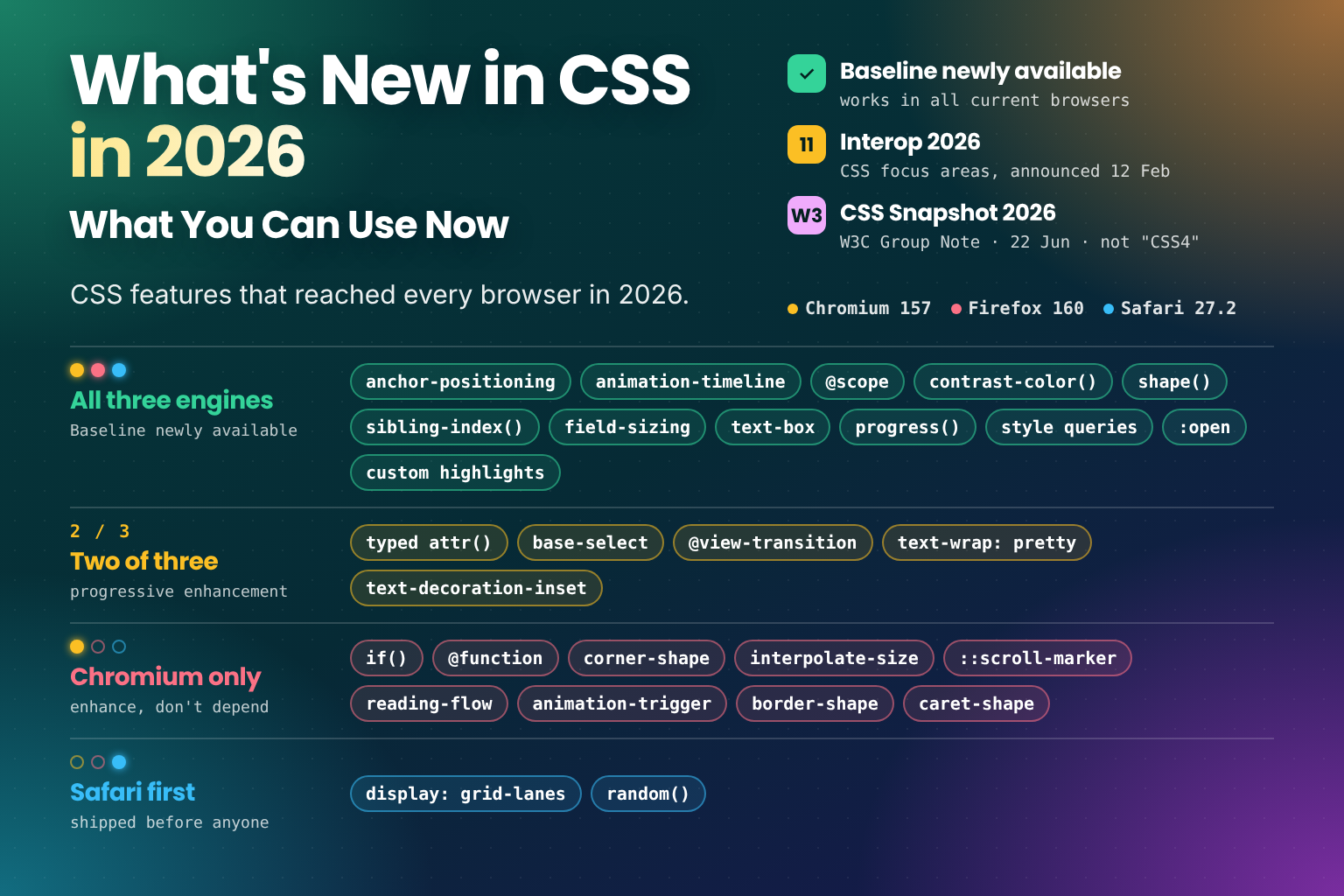
CSS doesn't have releases. There's no "CSS 2026" that browsers ship on a particular day, and there hasn't been a numbered version of CSS since CSS 2.1. Instead, each feature is specified in its own module and arrives in each browser engine on its own schedule. So the useful question for any year isn't "what was added to CSS?" but "what can I actually use now that I couldn't before?"
For 2026, the answer is a lot. Anchor positioning, scroll-driven animations, @scope, contrast-color() and a long
list of smaller features finished arriving in Chrome, Firefox and Safari. At the same time, Chromium shipped a run of
features that the other engines haven't caught up with yet, and Safari shipped two features before anyone else.
In this post, we'll cover:
- What "usable across browsers" means, and where Baseline fits in
- The features that reached all three engines, with a short example of each
- Features in two engines, waiting for a third
- Features only in Chromium, and the two that Safari shipped first
- How Interop 2026 and the CSS Snapshot 2026 fit in
- A summary table and frequently asked questions
All support data comes from MDN's browser compatibility data as of November 2026, when the current stable releases were Chrome and Edge 157, Firefox 160 and Safari 27.2. Versions are the first stable release with support, so any later version has the feature too.
What "Usable Across Browsers" Means
Almost every browser people use is built on one of three engines: Chromium (Chrome, Edge, Opera, Samsung Internet and most others), Gecko (Firefox) and WebKit (Safari, and every browser on iOS). "All three engines" means a feature works across all of them. New features often appear first in preview builds, such as Safari Technology Preview and Firefox Nightly, or behind a flag, a setting that's off by default, before they reach a stable release.
The yardstick most people use now is Baseline, the label shown on MDN, caniuse and web.dev. A feature is Baseline newly available once it works in the current versions of Chrome, Edge, Firefox and Safari, on desktop and mobile. It becomes Baseline widely available 30 months later, once most users' browsers have caught up.
Most of the features in the next section became Baseline newly available during 2026. That means current browsers
support them; it doesn't mean every visitor has updated. For anything a page can't work without, keep a fallback or
use @supports for a while yet.
Now in All Three Engines
Anchor Positioning
The headline feature of the year. Anchor positioning lets you tether an absolutely positioned element, such as a tooltip or a menu, to another element, with no JavaScript measuring and no positioning library:
.trigger {
  anchor-name: --menu;
}

.menu {
  position: absolute;
  position-anchor: --menu;
  position-area: bottom;
  position-try-fallbacks: --above;
}

@position-try --above {
  position-area: top;
}
position-area places the menu relative to its anchor on a 3×3 grid, and @position-try defines a fallback the
browser switches to when the first position would overflow the viewport. For the common case of flipping to the other
side, you don't need a custom rule at all: position-try-fallbacks: flip-block does it with a built-in keyword.
You'll also see anchor positioning at work in
placing a customisable select's picker.
Support: Chrome and Edge 125, Firefox 147, Safari 26. It was an Interop focus area in 2025 and carried over into 2026, and with Firefox 147 it became Baseline this year.
Scroll-Driven Animations
animation-timeline connects a CSS animation to scroll position instead of time. A reading progress bar, for
instance, is now a few lines of CSS:
@keyframes grow {
  from { transform: scaleX(0); }
  to { transform: scaleX(1); }
}

.reading-progress {
  transform-origin: left;
  animation: grow linear both;
  animation-timeline: scroll(root);
}
Set animation-timeline after the animation shorthand, because the shorthand resets it. view() timelines, which
track an element as it crosses the viewport, work the same way. For a fuller introduction, see the
animation-timeline section of An Interactive Guide to CSS Keyframes.
Support: Chrome and Edge 115, Safari 26, and Firefox 159, released in October 2026. It's one of the Interop 2026 focus areas, and Firefox's release means it now works in all three engines, though only very recently.
@scope
@scope limits a block of rules to a part of the DOM, with an optional lower boundary where the scope stops:
@scope (.card) to (.card-content) {
  img {
    border-radius: 8px;
  }
}
Images inside .card are rounded, but not those inside its .card-content slot, which might hold content from
elsewhere. When two scoped rules have the same specificity, the one whose scope root is closer in the DOM wins. It
pairs well with
cascade layers: layers decide which group of rules you trust more, while @scope
decides where a rule applies.
Support: Chrome and Edge 118, Firefox 146, Safari 26.4.
contrast-color()
contrast-color() takes a colour and returns black or white, whichever contrasts more with it. It's ideal for text on
user-chosen or theme-driven backgrounds:
.badge {
  background: var(--brand);
  color: contrast-color(var(--brand));
}
Choosing between black and white doesn't guarantee accessible contrast for every mid-tone background, so it's still
worth checking your actual palette. It works well alongside light-dark(). Native
form controls already do something similar for their accent colour, as
Theming Native Controls with accent-color
explains. For worked examples, mid-tone limits and fallbacks, see contrast-color(): Automatic Readable Text on Any Background.
Support: Chrome and Edge 147, Firefox 146, Safari 26. An Interop 2026 focus area.
shape()
shape() is a clip-path (and
offset-path) function
that uses the same commands as
the CSS path() function
but accepts any CSS units, including percentages and calc(), so shapes resize with the element:
.hero {
  clip-path: shape(
    from 0% 0%,
    line to 100% 0%,
    line to 100% 85%,
    line to 0% 100%,
    close
  );
}
Support: Chrome and Edge 135, Firefox 148, Safari 18.4. Another Interop 2026 focus area. The full guide is
The CSS shape() Function: Responsive clip-path Shapes.
sibling-index() and sibling-count()
These return an element's position among its siblings and the number of siblings, as integers you can use in
calc(). Staggered animations no longer need
an nth-child rule per item
or an inline custom property:
.list-item {
  transition-delay: calc(sibling-index() * 50ms);
}
Support: Chrome and Edge 138, Firefox 154, Safari 26.2. See
CSS-Only Staggered Animations with sibling-index() and sibling-count().
field-sizing
field-sizing: content makes a form control size itself to its content, so a textarea grows as you type and an input
fits its value:
textarea {
  field-sizing: content;
  min-block-size: 3lh;
  max-block-size: 12lh;
}
Support: Chrome and Edge 123, Firefox 152, Safari 26.2. See
Auto-Growing Textareas with CSS field-sizing: content.
text-box-trim and text-box
Text always carries extra space above and below the glyphs, which is why a button label never looks quite centred
and a heading never lines up exactly with an image beside it. text-box trims that space to the font's metrics:
h1,
.button {
  text-box: trim-both cap alphabetic;
}
This trims the top edge to the cap height and the bottom edge to the baseline.
Support: Chrome and Edge 133, Firefox 154, Safari 18.2.
progress()
progress() returns where a value sits between two others, as a number (0 at the start, 1 at the end), which you can
then feed into calc():
h1 {
  --p: clamp(0, progress(100vw, 320px, 1280px), 1);
  font-size: calc(1.5rem + 1.5rem * var(--p));
}
Here --p is 0 on a 320px viewport and 1 on a 1280px one, and the clamp() keeps it in that range outside those
widths. It's a readable building block for fluid sizing and for mapping one range onto another, without hand-written slope
arithmetic. If you build fluid type with clamp() today, compare it with
Fluid Typography and Spacing with clamp().
Support: Chrome and Edge 138, Firefox 155, Safari 26.
Container Style Queries
Container queries on size have been everywhere since 2023. Style queries, which test a custom property's value on a container, were the missing piece in Firefox:
.card-wrapper {
  --variant: featured;
}

@container style(--variant: featured) {
  .card {
    border-color: gold;
  }
}
Support (custom properties): Chrome and Edge 111, Firefox 151, Safari 18. An Interop 2026 focus area. For the full picture, read the style queries section of CSS Container Queries Deep Dive.
:open
:open matches elements that have an open state: <details> when expanded, <dialog> when showing, and <select>
and <input> pickers while their picker is displayed:
details:open > summary {
  font-weight: 600;
}
Support: Chrome and Edge 133, Firefox 136, Safari 26.5. It's part of Interop 2026's combined dialog and popover
focus area. For animating those elements as they open and close, see
Animate Dialogs & Popovers with CSS @starting-style.
Custom Highlights
The CSS Custom Highlight API lets you style arbitrary text ranges, such as search matches or spelling errors, without
wrapping them in extra elements. You register ranges in JavaScript and style them with ::highlight():
const paragraph = document.querySelector("p");
const range = new Range();
range.setStart(paragraph.firstChild, 0);
range.setEnd(paragraph.firstChild, 5);

CSS.highlights.set("search", new Highlight(range));
::highlight(search) {
background-color: yellow;
color: black;
}Support: Chrome and Edge 105, Firefox 149, Safari 17.2. Another Interop 2026 focus area.
In Two Engines, Waiting for a Third
These features work in two of the three engines. They're good candidates for progressive enhancement now: write the fallback first, and let supporting browsers pick up the enhancement.
Typed attr() lets attr() return real typed values, such as numbers, lengths and colours, in any property, not
just strings in content. It's in Chrome and Edge 133 and Firefox 155;
Safari has it in Technology Preview only.
"Advanced attr()" is an Interop 2026 focus area. See
HTML Attributes as Real CSS Values with Typed attr().
Customisable <select> with appearance: base-select gives you a fully stylable dropdown that keeps native
behaviour and accessibility. Opting in takes one rule:
select,
::picker(select) {
  appearance: base-select;
}
It's in Chrome and Edge 135 and, as of this year, Safari 27. Firefox has it behind a flag. Browsers without it keep
showing an ordinary select. See
Styling a <select> Dropdown with CSS appearance: base-select.
Cross-document view transitions (@view-transition) animate between full page loads. They're in Chrome and Edge
126 and Safari 18.2. Firefox has them in Nightly builds only. Same-document view transitions are more widely
supported, and
view-transition-name: match-element is in all three (Chrome 137, Firefox 144, Safari 18.4). For when a view
transition is the right tool and when @starting-style is, see
Comparison with the View Transitions API.
text-wrap: pretty, which avoids short last lines in paragraphs, is in Chrome and Edge 117 and Safari 26, but not
Firefox. Browsers that don't support it simply wrap normally, so it's safe to use today; it's one of the rules in
A Modern CSS Reset, Explained Rule by Rule.
text-decoration-inset, for shortening underlines at each end, is in Firefox 146 and Chrome and Edge 157, the
newest stable release. Safari has it in Technology Preview.
Chromium Only
Chrome and Edge shipped a long run of features that Firefox and Safari don't support in a stable release yet. They're fine to use as enhancements, but don't build anything essential on them:
| Feature | Chrome / Edge | Firefox | Safari | Guide |
|---|---|---|---|---|
if() | 137 | No | No | Conditional values with if() |
@function | 139 | No | Technology Preview | CSS custom functions |
corner-shape | 139 | Nightly | Technology Preview | Squircles with corner-shape |
interpolate-size, calc-size() | 129 | No | No | Animating height: auto |
::scroll-marker, scroll-marker-group | 135 | No | No | Pure CSS carousels |
scroll-target-group | 140 | No | No | |
| Scroll-state container queries | 133 | No | No | |
reading-flow | 137 | No | No | |
animation-trigger | 146 | No | No | |
border-shape | 147 | No | No | |
caret-shape | 144 | No | No |
Two of these, @function and corner-shape, are in Safari Technology Preview, and corner-shape is in Firefox
Nightly too, which are the strongest signs of what might spread next. if() and @function in particular change
how much logic you can keep in CSS, so they're worth learning now even if you only ship them behind a fallback:
.panel {
  background: white;
  background: if(style(--theme: dark): #111; else: white);
}
In a browser without if(), the second declaration is invalid and dropped, and the first one applies.
Safari First
Two features went the other way, with Safari shipping before anyone else.
display: grid-lanes, the long-debated masonry layout, is in Safari 26.4 and no other stable browser yet,
though Firefox has it in Nightly. Items are placed into columns (or rows) like a grid, but pack tightly along the
other axis instead of lining up in rows:
.gallery {
  display: grid;
  grid-template-columns: repeat(auto-fill, minmax(200px, 1fr));
  gap: 1rem;
}

@supports (display: grid-lanes) {
  .gallery {
    display: grid-lanes;
  }
}
Because grid-lanes uses the same track definitions, falling back to an ordinary grid costs one @supports block.
The fallback uses the auto-fill and minmax() pattern explained in
Responsive CSS Grid Layouts.
random() generates a random value within a range, directly in CSS, for things like confetti, scattered cards or
subtle variety in a pattern:
.card {
  rotate: 0deg;
  rotate: random(-4deg, 4deg);
}
Each matching element gets its own value, and browsers without random() drop the second declaration and keep the
first. It shipped in Safari 26.2 first and reached Chrome and Edge in 156. Firefox has had it behind a flag
(layout.css.random.enabled) since 158.
Interop 2026 and the CSS Snapshot
Two other yearly documents often get shared as lists of "what's new in CSS", but they answer different questions from this post.
Interop 2026 is the plan browser makers agreed in February 2026 for which features to make work the same in every
engine, measured by shared tests. Its CSS focus areas include advanced attr(), container style queries,
contrast-color(), custom highlights, media pseudo-classes, scroll-driven animations, scroll snap, shape(), anchor
positioning, view transitions and zoom. Many of the features above are on that list, and the remaining gaps, such as
typed attr() in Safari or media pseudo-classes in Chrome, are exactly what it's meant to close.
The W3C CSS Snapshot 2026 lists the specifications that make up CSS, grouped by how stable each one is. It isn't a list of features you can use, and it isn't "CSS4".
For how Interop is chosen and scored, its progress so far, Interop 2027, and how to read the CSS Snapshot alongside Baseline, see Interop 2026 and CSS Snapshot 2026: What They Mean for CSS.
2026 at a Glance
| Feature | Chrome / Edge | Firefox | Safari |
|---|---|---|---|
| Anchor positioning | 125 | 147 | 26 |
| Scroll-driven animations | 115 | 159 | 26 |
@scope | 118 | 146 | 26.4 |
contrast-color() | 147 | 146 | 26 |
shape() | 135 | 148 | 18.4 |
sibling-index(), sibling-count() | 138 | 154 | 26.2 |
field-sizing | 123 | 152 | 26.2 |
text-box-trim, text-box | 133 | 154 | 18.2 |
progress() | 138 | 155 | 26 |
| Container style queries (custom properties) | 111 | 151 | 18 |
:open | 133 | 136 | 26.5 |
| Custom highlights | 105 | 149 | 17.2 |
Typed attr() | 133 | 155 | Technology Preview |
appearance: base-select | 135 | Behind a flag | 27 |
random() | 156 | 161 (beta) | 26.2 |
display: grid-lanes | No | Nightly | 26.4 |
Frequently Asked Questions
Wrapping Up
2026 was the year a lot of long-awaited CSS finally became usable everywhere:
- Anchor positioning and scroll-driven animations reached all three engines
@scope,contrast-color(),shape()andsibling-index()became cross-browser toolsfield-sizing,text-box,progress(), style queries,:openand custom highlights filled in the gaps- Chromium pushed ahead with
if(),@function,corner-shapeand more - Safari shipped
grid-lanesandrandom()first
The features stuck in one or two engines are the interesting ones to watch next, and Interop 2026's dashboard is the best place to see which of them are closest to working everywhere. For which ones are most likely to get there in 2027, see What's New in CSS in 2027: What to Expect.
Sorting a whole year of CSS into "works everywhere", "two engines" and "Chromium only" meant checking every feature against the compatibility data rather than the launch posts, and a few surprised me, Safari shipping masonry first among them. I hope it helps you decide what to reach for on your next project. 🎨