
What's New in CSS in 2027: What to Expect
 (opens full-size image in a new tab)
Let's start with what this post isn't. 2027 hasn't happened yet, so nobody can tell you what CSS will ship in it. There's no CSS Snapshot 2027 from the W3C yet, browser vendors don't publish dated roadmaps for individual CSS features, and any article that promises "these features are coming in 2027" is guessing.
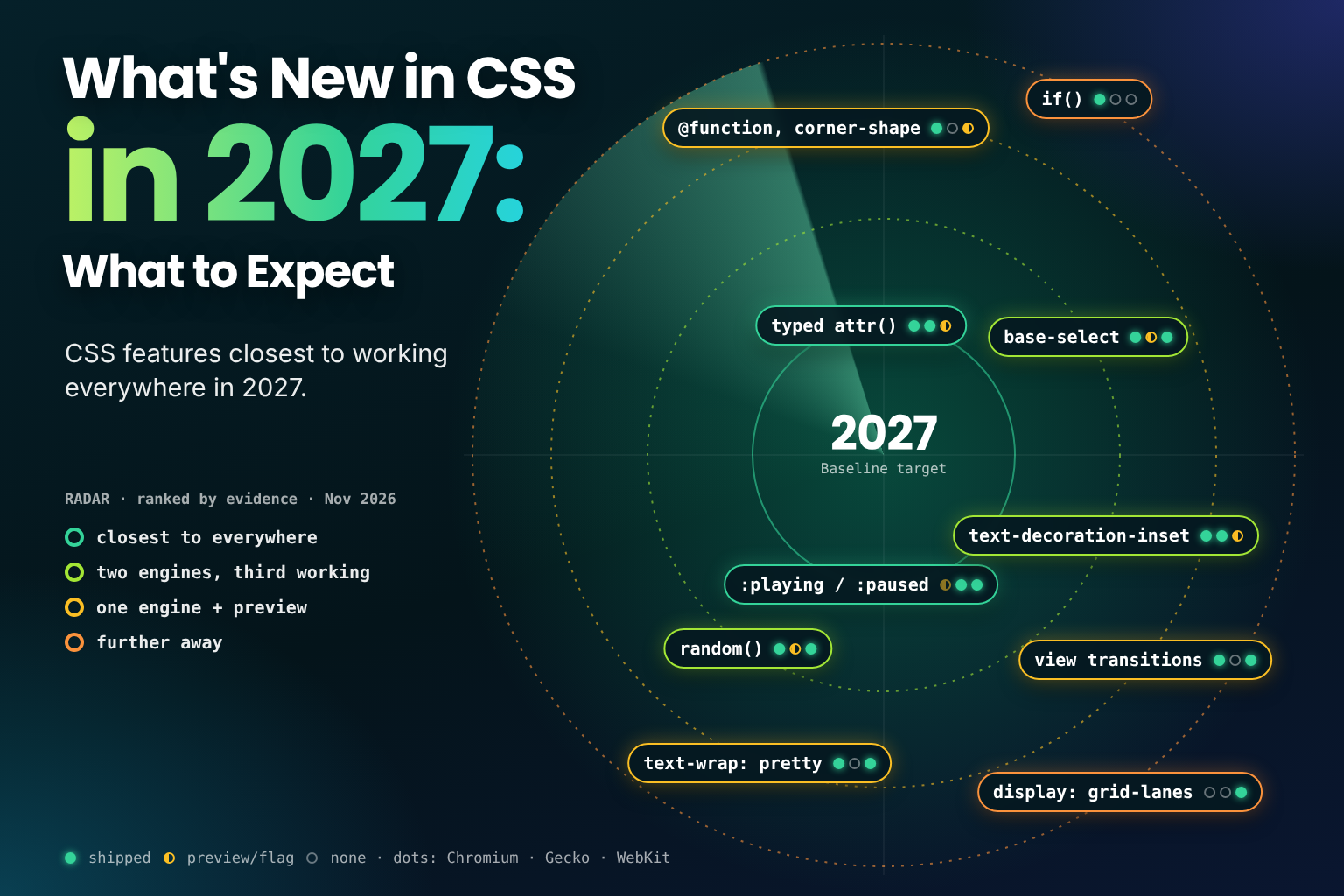
What we can do is look at the evidence. Features don't appear from nowhere: before a feature works in every engine, it usually ships in one or two, shows up in a preview build of the next, or gets picked as an Interop focus area. As of November 2026, there's plenty of that evidence to read. For the features that already became usable across browsers this year, see What's New in CSS in 2026: What You Can Use Now.
In this post, we'll cover:
- The kinds of evidence that predict cross-browser support, and how reliable each one is
- Interop 2026 areas with gaps still to close
- Features in two engines that need a third
- Features that are further away
- What "Baseline in 2027" will and won't mean
- How to track all of this yourself
- Frequently asked questions
What Counts as Evidence
A few terms come up throughout this post:
- Engines. Chrome, Edge, Opera and most other browsers share Google's Chromium engine. Firefox uses Mozilla's Gecko, and Safari uses Apple's WebKit. "All three engines" means Chromium, Gecko and WebKit, which together cover almost every browser people use.
- Preview builds. Safari Technology Preview and Firefox Nightly are early builds where new features appear before they reach a stable release. A feature can also sit behind a flag, a setting that's off by default.
- Baseline. A label from the WebDX community group, shown on MDN and elsewhere, that marks a feature as newly available once it works in the current version of every major browser, and widely available 30 months later.
Not all signals are equal. Roughly from strongest to weakest:
- Shipped in two engines, and in the third's preview build. Safari Technology Preview and Firefox's flags are where features are tested before a stable release. Shipping isn't guaranteed, but the work is clearly underway.
- An Interop focus area. Interop is a yearly public commitment by Apple, Google, Microsoft, Mozilla and others to make chosen features behave the same everywhere, measured by shared tests. It's a strong signal of intent.
- Shipped in two engines, with no visible activity in the third. Likely eventually, but the timing is unknown.
- Shipped in one engine only. Could be years away, or could stall if the other engines have concerns about the design.
Most of the features below combine more than one of these signals.
Interop 2026 Areas with Gaps Left
Interop 2026's CSS-related focus areas are advanced attr(),
container style queries,
contrast-color(), custom
highlights, dialogs and popovers (including the
:open pseudo-class), media pseudo-classes, scroll-driven animations, scroll snap,
shape(), and three areas carried over from 2025: anchor positioning, view transitions and CSS zoom. How
Interop is chosen and scored, and how far each engine has come, is covered in
Interop 2026 and CSS Snapshot 2026: What They Mean for CSS.
Many of them already work in all three engines. The Interop scores measure how consistently they behave, though, not just whether they exist, so the remaining work is often edge cases rather than missing features. A few still have an engine missing entirely, and those are the clearest candidates for 2027.
Typed attr()
Typed attr() lets an HTML attribute supply a real value, such as a number, a length or a colour, to any property:
.bar {
  inline-size: 50%;
  inline-size: attr(data-value type(<percentage>), 50%);
}
It's in Chrome and Edge 133 and Firefox 155. Safari has it in Technology Preview. It's also the core of the "advanced
attr()" Interop 2026 focus area. Two engines shipped, the third in preview, and an Interop commitment: this is the
strongest candidate on the list.
The cascade fallback above already works today: browsers without typed attr() drop the second declaration and use
the first. When a whole block of styles depends on a feature rather than a single declaration, wrap the block in an
@supports feature query instead, as the masonry example in the FAQ below does. The full guide is
HTML Attributes as Real CSS Values with Typed attr(), and the classic string form is
covered in CSS-Only Tooltips with attr() and content.
Media Pseudo-Classes
:playing and :paused match <audio> and <video> elements by playback state, so you can style custom controls
without listening for play and pause events:
/* Show the overlay play button only while the video is paused */
.player:has(video:paused) .play-overlay {
  opacity: 1;
}
They've been in Safari since 15.4 and reached Firefox in 150. Chrome announced its intent to ship them in May 2026, but they aren't in a stable Chrome release at the time of writing. With the third engine committed to them, and Interop 2026 covering them, they're likely to be usable everywhere soon.
Scroll-Driven Animations
Technically, scroll-driven animations already work in all three engines: MDN marks animation-timeline as Baseline
2026, newly available since October 2026, when Firefox 159 shipped it. 2027 is when they become usable without
hesitation: as visitors update and the Interop work smooths out differences, the fallback you write today can become a
formality. If they're new to you, the
animation-timeline section of An Interactive Guide to CSS Keyframes
covers scroll and view timelines, with an @supports fallback.
In Two Engines, Waiting for a Third
Customisable <select>
appearance: base-select turns <select> into a dropdown you can style completely, while keeping native keyboard
behaviour and accessibility. Opting in takes one rule, applied to the select and its picker:
select,
::picker(select) {
  appearance: base-select;
}
It's in Chrome and Edge 135 and Safari 27, and Firefox has it behind a flag. Two shipped engines plus active work in
the third makes this one of the stronger candidates. Browsers that don't support it keep showing an ordinary select,
so it's safe to adopt now. See
Styling a <select> Dropdown with CSS appearance: base-select.
text-decoration-inset
text-decoration-inset shortens an underline or other text decoration at each end, so it doesn't run the full width
of the text:
a {
  text-decoration-inset: 0.2em;
}
It shipped in Firefox 146 and in Chrome and Edge 157, and Safari has it in Technology Preview. Two engines shipped and the third in preview make it a good bet for 2027.
random()
random() returns a random value within a range, picked once when the style is computed, which is enough for
scattered layouts, jittered animations and decorative variety without JavaScript:
.sticker {
  rotate: -2deg;
  rotate: random(-6deg, 6deg);
}
It shipped in Safari 26.2 and in Chrome and Edge 156, and Firefox has had it behind a flag
(layout.css.random.enabled) since 158. Two engines shipped and experimental work in the third make it a reasonable
candidate, though the flag hasn't reached a stable default yet. If you want variation that's
predictable rather than random, such as staggered delays, sibling-index() already does that; see
CSS-Only Staggered Animations with sibling-index() and sibling-count().
@function and corner-shape
Both are in Chrome and Edge 139 and in Safari Technology Preview, and neither is in Firefox. Safari's preview builds make them more likely to reach a second engine in 2027 than to reach all three:
@functiondefines reusable functions in plain CSS, which changes how design systems can share logic.corner-shapeadds squircles, bevels, notches and scoops toborder-radius.
Both degrade cleanly. A browser that doesn't understand corner-shape keeps the ordinary rounded corners from
border-radius, and a browser that doesn't understand @function drops any declaration that calls a custom function,
so a plain value declared first still applies:
@function --negate(--value) {
  result: calc(-1 * var(--value));
}

.pull-up {
  margin-block-start: -1rem;
  margin-block-start: --negate(1rem);
}
Other Two-Engine Features
Two more features are in Chrome and Safari but not Firefox: cross-document view transitions (@view-transition,
Chrome 126 and Safari 18.2) and text-wrap: pretty (Chrome 117 and Safari 26). Both are safe to use now as
enhancements, since unsupported browsers simply do without them. text-wrap: pretty is already one of the rules in
A Modern CSS Reset, Explained Rule by Rule.
Further Away
Some features have strong support in one engine but little visible movement elsewhere. They may well arrive, but the evidence doesn't point to 2027 specifically:
if()is in Chrome and Edge 137 only, with no Firefox or Safari support, not even in preview. See Conditional CSS Values with theif()Function.display: grid-lanes(masonry layout) is in Safari 26.4 and later only. Chrome and Firefox don't support it in a stable release.interpolate-sizeandcalc-size(), for animating toheight: auto, are Chromium-only.- Scroll markers (
::scroll-marker,scroll-marker-group,scroll-target-group), used for pure CSS carousels, are Chromium-only. - Scroll-state container queries,
reading-flow,animation-trigger,border-shapeandcaret-shapeare all Chromium-only.
None of these are bad bets in the long run. They just don't yet have the second engine or the Interop commitment that would make a 2027 prediction honest.
At a Glance
| Feature | Chrome / Edge | Firefox | Safari | Evidence |
|---|---|---|---|---|
Typed attr() | 133 | 155 | Technology Preview | Two engines, third in preview, Interop 2026 |
:playing, :paused | In development | 150 | 15.4 | Two engines, third intends to ship, Interop 2026 |
appearance: base-select | 135 | Behind a flag | 27 | Two engines, third behind a flag |
text-decoration-inset | 157 | 146 | Technology Preview | Two engines, third in preview |
random() | 156 | Behind a flag | 26.2 | Two engines, third behind a flag |
@function | 139 | No | Technology Preview | One engine, one in preview |
corner-shape | 139 | No | Technology Preview | One engine, one in preview |
| Cross-document view transitions | 126 | No | 18.2 | Two engines |
text-wrap: pretty | 117 | No | 26 | Two engines |
if() | 137 | No | No | One engine |
display: grid-lanes | No | No | 26.4 | One engine |
What "Baseline in 2027" Will Mean
If typed attr() or customisable <select> reaches the last engine in 2027, it becomes Baseline newly
available: supported in the current version of every core browser. It doesn't become Baseline widely
available until 30 months after that, once most people's browsers have caught up.
So the features that become Baseline in 2027 still need fallbacks for a while, and the features that became Baseline in 2026, such as anchor positioning, won't be widely available in 2027 either. What does get easier in 2027 is using this year's arrivals with lighter fallbacks, because more visitors will have updated.
How to Track It Yourself
Predictions go out of date fast. These are the sources worth bookmarking:
- Baseline on MDN. Every MDN reference page shows a Baseline badge and a detailed compatibility table.
- webstatus.dev. Tracks Baseline status and browser support across many features at once.
- The Interop dashboard at wpt.fyi. Shows the scores for each Interop focus area, per browser, through the year.
- caniuse.com. The quickest way to check a single feature, including usage figures.
- MDN browser-compat-data (BCD). The open dataset behind MDN's tables and Baseline. Its release notes on GitHub list every support change.
- Preview builds. Safari Technology Preview and Firefox Nightly release notes are where features appear before a stable release.
The Interop 2027 focus areas are due to be published on 4 February 2027, with the launch on 11 February, though the dates may move; see What Happens Next: Interop 2027. That list will be the best single guide to what the browser vendors intend to work on together for the rest of the year.
Frequently Asked Questions
Wrapping Up
Nobody can tell you exactly what CSS 2027 will bring, but the evidence points in a clear direction:
- Typed
attr()has the strongest case: two engines, Safari's preview build, and an Interop 2026 commitment - Media pseudo-classes, customisable
<select>,text-decoration-insetandrandom()all have work underway in the last engine - Cross-document view transitions and
text-wrap: prettyare in two engines and need Firefox @functionandcorner-shapeare likely to reach a second engine before a thirdif(),grid-lanesand the other single-engine features are further away
The best habit is to check the sources rather than the predictions, mine included. If you'd like to start using some of these today with proper fallbacks, the tutorials linked throughout this post are a good place to begin.
Predictions are easy to get wrong, so this post took far more checking than writing: browser release notes, the Interop 2026 announcement, preview builds and MDN's compatibility data, so that every prediction rests on something already shipping or in testing rather than a vendor promise. I'll revisit the list as 2027 unfolds, and I hope the tracking links help you keep score too. 🔭