
Interop 2026 and CSS Snapshot 2026: What They Mean for CSS
 (opens full-size image in a new tab)
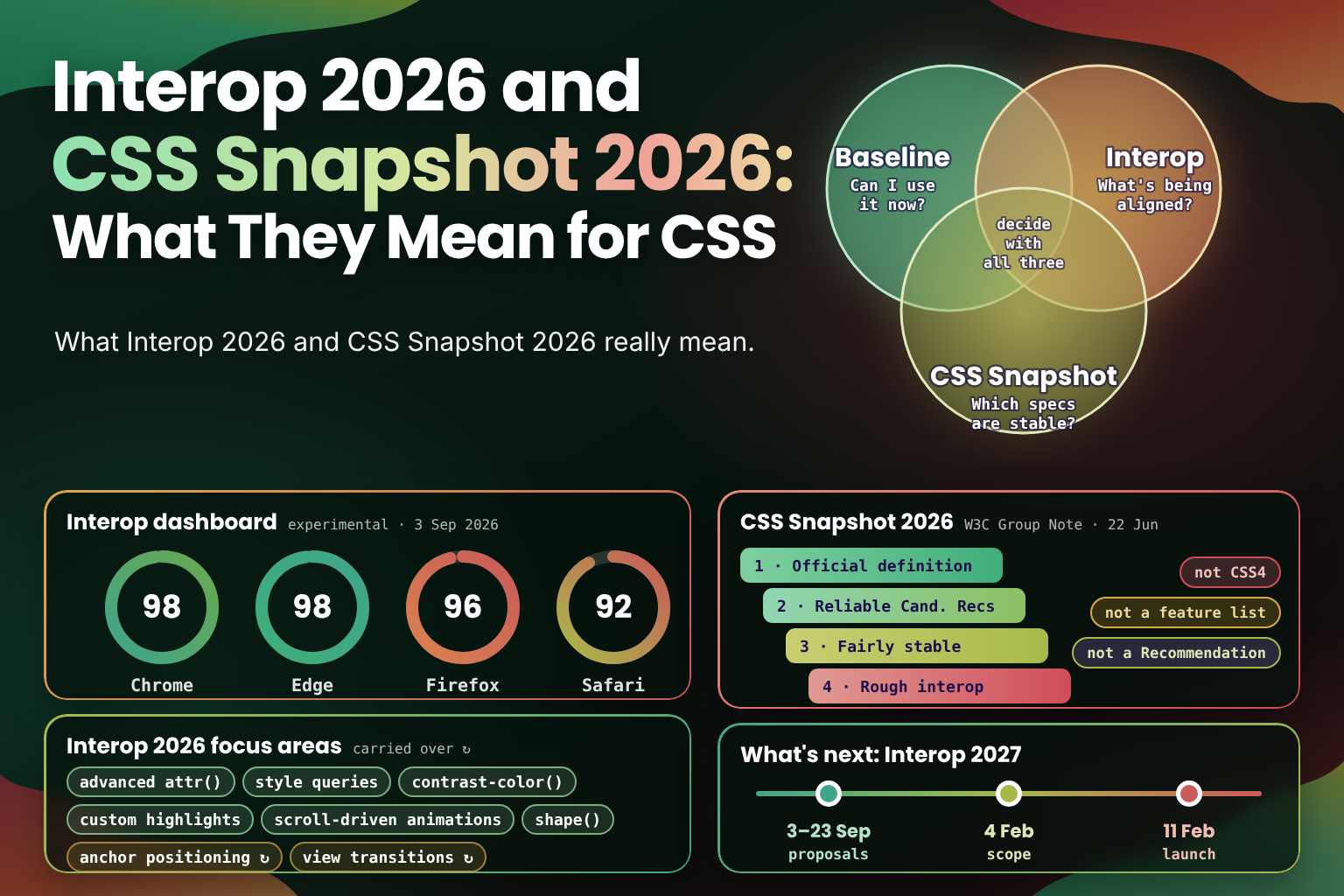
Every year, two documents appear that sound as if they answer the question "what's in CSS now?" One is Interop, the project in which browser makers agree on a set of features to make work the same everywhere. The other is the W3C's CSS Snapshot, a list of the specifications that make up CSS. Both get shared widely, and both get misread, usually as a list of features that are ready to use.
Neither of them is that. Interop is a plan for the coming year, measured by tests. The Snapshot is a statement about how mature each specification is. The question "can I use this today?" belongs to a third source, Baseline. Knowing which question each one answers makes all three far more useful.
In this post, we'll cover:
- The three questions, and which source answers each one
- What Interop is, how its focus areas are chosen and how it's scored
- The Interop 2026 focus areas for CSS, and what each one means for you
- How to read the Interop dashboard
- Where Interop 2026 stands, and what happens next with Interop 2027
- What the CSS Snapshot 2026 is, how it groups specifications and what it isn't
- Why CSS has levels and modules instead of version numbers
- A simple process for deciding whether to use a new feature
Three Sources, Three Questions
| Baseline | Interop | CSS Snapshot | |
|---|---|---|---|
| Question it answers | Can I use this in current browsers? | Which features are browser makers working to align this year? | Which specifications are stable? |
| Who publishes it | The W3C WebDX Community Group, shown on MDN, caniuse and web.dev | Browser makers and other participants, together | The W3C CSS Working Group |
| Based on | Which browser versions support a feature | Shared tests in the web-platform-tests project | How mature each specification is |
| How often | Updated continuously | Once a year, scored all year | Once a year |
| Best used for | Deciding what to ship | Predicting what will become usable | Judging whether syntax is likely to change |
The rest of this post is about the second and third columns. If you're new to Baseline: a feature is Baseline newly available once it works in the current versions of Chrome, Edge, Firefox and Safari, and Baseline widely available 30 months after that. For the CSS features that became usable this year, with support versions for each, see What's New in CSS in 2026: What You Can Use Now.
What Interop Is
Browsers don't only differ in which features they support. Two browsers can both "support" a feature and still behave differently in the details, and those differences are often what makes a feature painful to use. Interop exists to fix both problems at once.
It began in 2021 as Compat 2021, focused on a handful of areas developers had reported as the most painful, such as flexbox and grid. It was renamed Interop in 2022 and has run every year since. It's run by representatives of companies that contribute heavily to browser engines, including Apple, Bocoup, Google, Igalia, Microsoft and Mozilla.
When this post talks about engines, it means the three that render almost every page on the web: Blink (Chrome, Edge, Opera and most other Chromium browsers), Gecko (Firefox) and WebKit (Safari, and every browser on iOS). A feature is only dependable once it works the same in all three.
Each year works the same way:
- Anyone can propose a focus area. Proposals are filed publicly each September, often by developers, with evidence of why the feature matters and where browsers disagree.
- Participants agree on a list. Every focus area needs the participants' agreement, so a feature only gets in if every engine is willing to work on it.
- Each focus area gets tests. The tests live in web-platform-tests, the shared test suite every browser engine runs.
- Progress is scored all year. Each browser gets a score for the share of focus-area tests it passes, and the project gets an overall "interop" score for the tests that pass in every browser.
Some years also include investigation areas. These aren't scored. They're for problems that need work before they can be tested, such as writing the tests themselves.
Interop 2026: The CSS Focus Areas
Interop 2026 was announced on 12 February 2026, with 20 focus areas, 15 of them new and 5 continuing from 2025, plus four investigation areas. Its CSS focus areas are:
- Advanced
attr(): reading HTML attributes as typed values, such as numbers, lengths and colours, in any property. See HTML Attributes as Real CSS Values with Typedattr(). - Container style queries: querying a container's custom properties with
@container style(). See The Frontier: Style Queries. contrast-color(): picking whichever of black or white contrasts better with a given colour. Seecontrast-color(): Automatic Readable Text on Any Background.- Custom highlights: styling arbitrary ranges of text, such as search results, with
::highlight(). - Media pseudo-classes:
:playing,:paused,:seeking,:buffering,:stalled,:mutedand:volume-locked, for styling<audio>and<video>by their state. - Scroll-driven animations: animations whose progress follows scrolling, with
animation-timeline. Seeanimation-timeline. - Scroll snap: consistent snapping behaviour across engines.
shape(): responsive, path-like shapes forclip-pathand other properties. See Path-Basedclip-pathwith theshape()Function.- Anchor positioning, carried over from 2025.
- View transitions, continuing from 2025 and now extended to cross-document view transitions between pages.
- CSS
zoom, carried over from 2025.
Two more areas matter to CSS authors. Dialogs and popovers covers <dialog closedby>, popover="hint" and the
:open pseudo-class, which is how you style an open dialog, <details> or <select>. Web compat includes making
the unprefixed user-select work everywhere, so -webkit-user-select is no longer needed. Outside CSS, the 2026 focus
areas include the Navigation API, scoped custom element registries, IndexedDB's getAllRecords() and WebTransport.
What the List Tells You
The list mixes two kinds of feature. Some, such as anchor positioning and scroll-driven animations, were already in most
browsers and are there to iron out differences. Others, such as typed attr() and the media pseudo-classes, were
missing from at least one engine and are there to get them shipped everywhere.
Either way, a focus area is a public commitment by every engine to work on that feature in that year, backed by tests. That makes it the best predictor there is of what will become usable soon. If a feature you want is a 2026 focus area, it's reasonable to expect it to reach all three engines, or to behave much more consistently, within the year. If it isn't, there's no such commitment, even if one browser already has it.
Carried-over areas deserve a second look. They're usually features that are large or hard to get exactly right, and being carried over means they aren't finished yet, not that they've stalled.
Reading the Interop Dashboard
Progress is published on the Interop 2026 dashboard at wpt.fyi. For each focus area, it shows each browser's score, which is the percentage of that area's tests it passes, and an overall interop score for the tests that pass in all of them.
A few things are worth knowing when you read it:
- Stable and experimental. The dashboard can show scores for stable releases or for preview builds, such as Chrome Canary, Firefox Nightly and Safari Technology Preview. Experimental scores rise first; stable scores are what your users have.
- A score isn't a support table. A browser can pass 90% of an area's tests and still be missing the part you need, or pass few tests because of edge cases you'll never hit. For a specific property or value, check MDN or caniuse.
- The interop score is the one to watch. A single browser's score can be high while the others lag. The interop score only rises when the same tests pass everywhere, which is what makes a feature dependable.
Where Interop 2026 Stands
By early September 2026, the experimental builds of every browser passed more than 90% of the focus-area tests:
| Browser (experimental build) | Score out of 100, 3 September 2026 |
|---|---|
| Chrome | 98 |
| Edge | 98 |
| Firefox | 96 |
| Safari | 92 |
For comparison, Interop 2025 ended with an overall interop score of 95, with Chrome at 99, Edge at 98, Firefox at 99 and Safari at 98. Scores usually keep climbing through the last quarter of the year, and stable releases follow the experimental ones by a few weeks to a few months.
What Happens Next: Interop 2027
The cycle for next year is already under way. Proposals for Interop 2027 were open from 3 to 23 September 2026, and the participants are now choosing among them. The current plan is to publish the scope on 4 February 2027 and launch on 11 February 2027, though the dates may move.
Any Interop 2026 focus area that hasn't reached full interoperability by the end of the year is automatically resubmitted for 2027. So if a 2026 feature you care about is still behind in one browser, there's a good chance it will stay on the list for another year. For the 2026 areas that still have gaps, and the other features most likely to become usable in 2027, see What's New in CSS in 2027: What to Expect.
The W3C CSS Snapshot 2026
The CSS Working Group publishes a CSS Snapshot each year. CSS Snapshot 2026 was first published as a W3C Group Note on 26 February 2026 and revised on 26 March and 22 June 2026. The 22 June version is the current one.
To read it, it helps to know how a W3C specification matures. It starts as a Working Draft, which can still change a lot. When the Working Group considers it feature-complete, it becomes a Candidate Recommendation, and browsers are expected to implement it. Once it has proven implementations, it can become a Recommendation, the W3C's final standard. Most CSS modules spend years as Working Drafts or Candidate Recommendations while browsers already ship them.
The Snapshot does two things.
It Lists the Specifications That Make Up CSS
CSS isn't one specification. It's dozens of modules, such as Selectors, Color, Grid Layout and Values and Units, each moving at its own pace. The Snapshot gathers them into one list and groups them by how stable each specification is:
- The Official Definition: the specifications considered stable and complete enough to define CSS as of the Snapshot.
- Reliable Candidate Recommendations: modules that are feature-complete and unlikely to change much, though they haven't finished the full W3C process.
- Fairly Stable Modules with limited implementation experience: specifications that look settled, but haven't been implemented widely enough to prove it.
- Modules with Rough Interoperability: specifications that are implemented, but where browsers still differ.
It Explains How to Implement CSS Responsibly
The rest of the Snapshot is written for browser makers. It covers how to handle experimental and partial implementations, so that early versions of a feature don't become something websites depend on before the specification is settled. It also lists exceptions: features that are safe to ship before their specification reaches Candidate Recommendation, because they're stable in practice.
What It Isn't
- It isn't a list of features you can use. The Snapshot says so itself: it includes modules "by specification stability, not Web browser adoption rate". A specification can be stable years before the last browser ships it, and a feature can be in every browser while its specification is still changing.
- It isn't CSS4. There is no CSS4, and the Snapshot isn't a new version of CSS. It's a description of the language as it stands in 2026.
- It isn't a W3C Recommendation. A Group Note is published by the Working Group, but it isn't endorsed by the W3C or its members the way a Recommendation is.
For everyday work, the Snapshot is most useful when you depend on syntax that might change, for example when you write a polyfill or a tool that parses CSS. A feature in a module listed as reliable is a safer foundation than one in a module still settling.
Why CSS Has No Version Numbers
CSS 1 and CSS 2 were single specifications. After CSS 2.1, the language was split into modules, so that each part could move forward without waiting for the rest. Modules have levels instead of versions: Selectors Level 4, Color Level 5 and so on. A new level builds on the previous one and doesn't replace it.
Calling everything after CSS 2.1 "CSS3" was a convenient label, not a specification, and there's no CSS4 because there's no longer a single thing to number. That's why the useful question about any year is what became usable, not which version came out, and why the Snapshot describes CSS at a point in time instead of declaring a new version of it.
Deciding Whether to Use a Feature
Put together, the three sources give a simple process for any new feature:
- Check Baseline. If it's widely available, use it. If it's newly available, use it with a fallback for older
browsers, or behind
@supports, depending on how much the page relies on it. - If it isn't Baseline, check Interop. A current focus area means every engine has committed to it, so it's worth learning now and using as a progressive enhancement. Without one, treat it as experimental, and keep anything essential independent of it.
- If you're building on its syntax, check the Snapshot. For polyfills, tooling or large design-system decisions, a specification in a stable module is less likely to change under you.
/* Works everywhere */
.card {
  background: white;
  color: black;
}

/* An Interop 2026 focus area: use it where it's supported */
@supports (color: contrast-color(red)) {
  .card {
    --surface: var(--brand, white);
    background: var(--surface);
    color: contrast-color(var(--surface));
  }
}
Frequently Asked Questions
Wrapping Up
Interop and the CSS Snapshot are both worth following, as long as you read them for what they are. Interop is the year's plan, backed by tests and scored in public, and it's the best guide to what will become usable next. The Snapshot is the CSS Working Group's view of which specifications have settled, written mainly for browser makers. For the day-to-day question of what you can ship, Baseline and the support tables remain the right tools.
Key points to remember:
- Baseline answers "can I use it now?"; Interop answers "what's being aligned this year?"; the Snapshot answers "which specifications are stable?"
- Interop focus areas are agreed by every engine and measured by shared tests, which makes them a strong predictor
- The Interop 2026 CSS areas include advanced
attr(), container style queries,contrast-color(), custom highlights, scroll-driven animations andshape() - On the dashboard, the interop score, not a single browser's score, shows when a feature is dependable
- By September 2026, every engine scored 92 or higher on experimental builds; Interop 2027 launches in February 2027
- The CSS Snapshot 2026 is a W3C Group Note that groups specifications by stability; it isn't a feature list, CSS4 or a Recommendation
Every time a new Interop list or CSS Snapshot comes out, I see it shared as a list of things we can finally use, and I wanted one place that untangles the three sources that actually answer different questions. I hope the next time one of them lands in your feed, you know exactly which question it answers, and which tool to open for the rest. 🧭