
Backwards-Compatible JavaScript: Polyfills and Baseline
 (opens full-size image in a new tab)
Introduction
Every year JavaScript gets new methods, new syntax and new browser APIs, and every year some of your users are on a browser that's a few versions behind. Writing backwards-compatible JavaScript means using the new features where they exist without breaking the page where they don't.
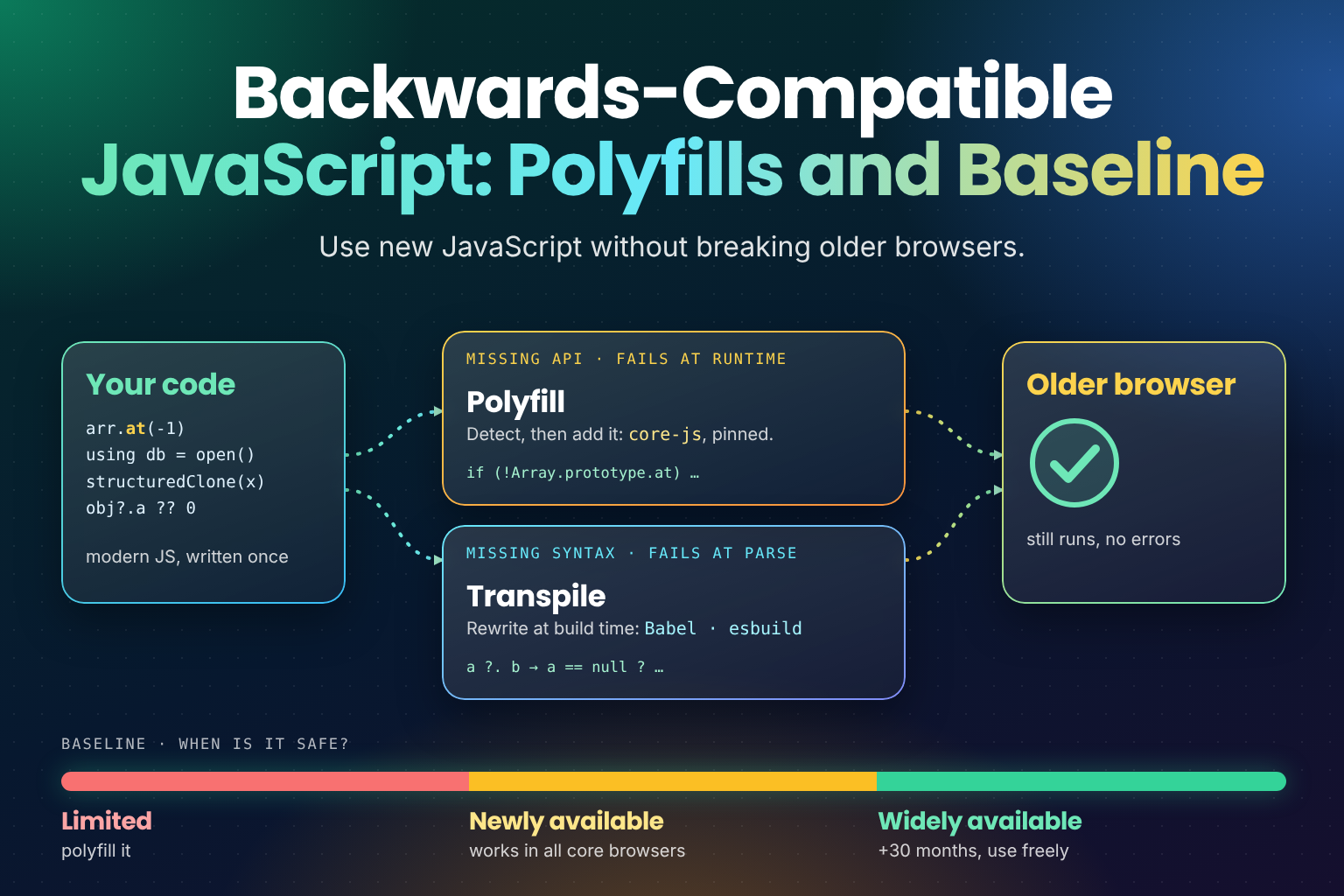
There are three tools for that job, and they solve different problems:
- Feature detection asks the browser what it supports, at runtime.
- Polyfills add missing APIs, such as a method on
Set, before your code needs them. - Transpilers rewrite new syntax into older syntax at build time.
On top of those, Baseline gives you a shared, browser-neutral answer to "is this safe to use yet?", and browserslist turns that answer into build configuration. (The CSS side of the same question is covered in Interop 2026 and CSS Snapshot 2026.)
This post covers all of them, with the patterns I use and the mistakes worth avoiding. Several tutorials on this site
already end with a "Browser Support and Fallbacks" section, such as the ones for
native Set methods and
Array.fromAsync(). This is the general
version of those sections.
What You'll Learn
- The difference between a missing API and missing syntax, and why it decides your strategy
- Feature detection with
typeof,inandtry/catch, and how to detect syntax - Writing and loading polyfills safely, including what the polyfill.io incident teaches
- What Babel, esbuild and TypeScript can and can't do for older browsers
- Baseline: newly available versus widely available
- Using browserslist's Baseline queries, the history of
module/nomodule, and how to test it all
APIs vs Syntax: The Distinction That Decides Everything
A new JavaScript feature is one of two things:
- An API: a new global, constructor, method or property, such as
Promise.try(),Set.prototype.union()orMap.prototype.getOrInsert(). Code that uses a missing API parses fine and fails when that line runs, with aTypeErrororReferenceError. - Syntax: a new way of writing code, such as
usingdeclarations, regex pattern modifiers like(?i:...), or thewithclause on imports. An engine that doesn't know the syntax fails when it parses the file, so none of the file runs, not even the parts that use old features.
That difference decides your options:
| Missing API | Missing syntax | |
|---|---|---|
| When it fails | When the line runs | When the file is parsed |
| How much breaks | That code path | The whole script or module |
| Can you detect it at runtime? | Yes, easily | Only indirectly |
| Can a polyfill add it? | Yes | No |
| Can a transpiler rewrite it? | No | Often, not always |
Keep this table in mind for the rest of the post. Most compatibility bugs come from treating one kind as the other,
such as expecting a transpiler to add Set.prototype.union, or a polyfill to add using.
Feature Detection
Feature detection checks for the feature itself, not for a browser name or version. It's always more reliable than
reading navigator.userAgent: user-agent strings are frozen or reduced in modern browsers, they're easy to spoof, and
a version number tells you nothing about a feature that's behind a flag or was removed.
typeof Checks
The most common check is whether a function exists:
const hasSetMethods = typeof Set.prototype.union === "function";
const hasPromiseTry = typeof Promise.try === "function";
For a global that may not exist at all, use typeof on the global itself first. Reading an undeclared variable
throws a ReferenceError, but typeof on it safely returns "undefined":
// Throws a ReferenceError in an engine without Iterator
// const hasHelpers = typeof Iterator.prototype.take === "function";

const hasIteratorHelpers =
  typeof Iterator !== "undefined" &&
  typeof Iterator.prototype.take === "function";
The in Operator
in checks whether a property exists on an object or anywhere on its prototype chain, which suits globals and
prototype methods:
const hasStructuredClone = "structuredClone" in globalThis;
const hasUpsert = "getOrInsert" in Map.prototype;
const hasPopover = "showPopover" in HTMLElement.prototype;
in only tells you the name exists. If a value could be present but unusable (some APIs exist but throw in insecure
contexts, for example), call it inside a try/catch as well. For CSS, the equivalent checks are CSS.supports() in
JavaScript and @supports in a stylesheet.
Detecting Syntax
You can't check for syntax with typeof, because a file that contains unsupported syntax never runs. The check has to
make the engine parse the syntax separately and see whether that fails.
For regular expression syntax, the RegExp constructor does exactly that, since it parses the pattern at runtime:
function supportsRegex(pattern) {
  try {
    new RegExp(pattern);
    return true;
  } catch {
    return false;
  }
}

supportsRegex("(?i:a)");          // pattern modifiers
supportsRegex("(?<y>a)|(?<y>b)"); // duplicate named groups
For other syntax, put the new code in its own small module and load it with a dynamic import. If the engine can't
parse the module, the import() promise rejects with a SyntaxError, and the page carries on:
// probe-using.js contains only:
// { using probe = null; }
// export default true;

async function supportsUsing() {
  try {
    await import("./probe-using.js");
    return true;
  } catch {
    return false;
  }
}
A failed network request also rejects the promise, so serve the probe from the same place as the rest of your code. Keep the probe file out of your bundler and transpiler too. If the build rewrites it, the new syntax disappears and the check passes everywhere, which defeats its purpose.
You'll also see new Function("...") used for syntax checks, because it parses a string as code. It works, but it has
a catch: a Content Security Policy without 'unsafe-eval' blocks new Function and eval entirely. The call
throws whether or not the syntax is supported, so the check quietly reports false for everyone. Since a strict CSP is
good practice, prefer the dynamic import approach.
Polyfills
A polyfill is code that adds a missing API using features the browser already has. It checks first, and only defines the API if it's missing, so browsers with a native version keep using it.
What a Polyfill Looks Like
Here's a small polyfill for Promise.try():
if (typeof Promise.try !== "function") {
  Object.defineProperty(Promise, "try", {
    value: function (fn, ...args) {
      return new this((resolve) => resolve(fn(...args)));
    },
    writable: true,
    configurable: true
  });
}
Three details matter. The typeof check leaves a native version alone. Object.defineProperty makes the method
non-enumerable, like a built-in, so it won't show up in for...in loops. And a throw inside the Promise executor
becomes a rejection, which is exactly the behaviour Promise.try promises.
Hand-written polyfills are fine for something this small, but spec details add up quickly: argument validation, edge cases, property attributes. For anything bigger, use a maintained library.
core-js
core-js is the most complete polyfill library for the JavaScript standard library. It covers the ES2025 additions
such as iterator helpers, the new Set methods, Promise.try and RegExp.escape, and newer ones as they're
standardised. You can import a single feature or a whole namespace:
import "core-js/actual/set";      // Set methods only
import "core-js/actual/iterator"; // Iterator and its helpers
Importing all of core-js adds a lot of code that modern browsers don't need. Two better approaches follow.
Loading Only What You Need
Let the build decide. With Babel's @babel/preset-env, set useBuiltIns: "usage" and it adds a core-js import
only for the features your code uses that your target browsers lack:
// babel.config.js
export default {
  presets: [
    ["@babel/preset-env", {
      useBuiltIns: "usage",
      corejs: "3.40" // match the core-js version you installed
    }]
  ]
};
Give corejs the minor version you have installed, not just "3". Babel only injects polyfills it knows that version
contains, so "3" means features added in later 3.x releases are silently skipped.
Or decide at runtime. In a module, a dynamic import loads a polyfill only in browsers that need it, so current browsers download nothing extra:
if (typeof Set.prototype.union !== "function") {
  await import("core-js/actual/set");
}

// Safe to use the Set methods from here on
The top-level await makes later code in the module wait for the polyfill. The cost is an extra request for the
browsers that need it, which is usually a fair trade.
Only Load Polyfills from Sources You Control
A polyfill runs before your own code, with full access to the page. That makes where it comes from a security decision, not just a performance one.
For years, a popular approach was a <script> tag pointing at the polyfill.io service, which sent each browser
the polyfills it needed. In 2024 the polyfill.io domain was taken over, and it began serving malicious code to the many
sites that still loaded it. Those sites had done nothing wrong except trust a third-party domain they didn't control.
The lessons are general:
- Bundle polyfills with your own code, or serve them from your own domain, rather than from a third-party CDN.
- Pin versions in
package.jsonand commit your lockfile, so a dependency can't change under you. - If you must load a third-party script, use Subresource Integrity (
integrity="sha384-..."), so the browser refuses a file that has changed. SRI only works for files that don't change, so it can't protect a service that generates a different response per browser, which is exactly how polyfill.io worked. - Remove what you no longer need. A polyfill for a feature every target browser supports is pure risk and weight.
Transpiling Syntax vs Polyfilling APIs
A transpiler reads your source code and writes out equivalent code in older syntax. It can turn optional chaining
into explicit checks, class fields into constructor assignments, or a using declaration into a try/finally
block. What it can't do is invent APIs: if your code calls Set.prototype.union, the output calls it too.
The three tools you're most likely to use each have a target setting:
// Babel: targets come from browserslist (see below) or an explicit option
["@babel/preset-env", { targets: "baseline widely available" }]

// esbuild: a language version or browser versions
// esbuild app.js --bundle --target=es2020
// esbuild app.js --bundle --target=chrome120,firefox120,safari17

// TypeScript (tsconfig.json)
// { "compilerOptions": { "target": "ES2020", "lib": ["ES2025", "DOM"] } }
Two common misunderstandings:
- TypeScript's
libdoesn't add anything at runtime."lib": ["ES2025"]only tells the type checker thatSet.prototype.unionexists. If the browser doesn't have it, the call still throws. You need a polyfill as well. - Not all syntax can be lowered. Some newer syntax has no practical older equivalent, and a tool will either refuse (esbuild reports an error when it can't transform syntax for your target) or leave it in place. Check your build output when you target old browsers.
Why using Needs Both
Explicit resource management is a good example of a feature that's both syntax and API. The using keyword is
syntax, so no polyfill can add it: an engine that doesn't know it fails to parse the file. A transpiler can rewrite it
into a try/finally block, and TypeScript has supported that since version 5.2.
But the rewritten code still calls [Symbol.dispose]() on your objects, and DisposableStack and SuppressedError
are plain APIs. So the transpiled output still needs those to exist at runtime, which means a polyfill (core-js
includes them) in browsers that lack them. Note that using is part of ES2027, not ES2026 as it's sometimes reported.
Explicit Resource Management with using and await using covers the
feature itself.
Baseline
Picking which browsers to support used to mean arguing about version numbers. Baseline replaces that with a shared label, maintained by the W3C WebDX Community Group and shown on MDN and other developer sites.
Baseline tracks a core browser set: Chrome, Edge, Firefox and Safari, on desktop and mobile. A feature has one of three statuses:
- Limited availability: at least one core browser doesn't support it yet.
- Newly available: it works in the latest version of every core browser. The year this happens becomes its Baseline year, such as "Baseline 2024".
- Widely available: 30 months have passed since it became newly available. That gap allows for people who don't update straight away, and for older devices.
For example, the new Set methods became Baseline newly available in 2024, once Firefox 127 shipped them, so they
reach widely available 30 months later, at the end of 2026. Array.fromAsync() got there earlier, and is already
widely available.
"Widely available" is a sensible default for most sites. Use a newly available feature with a fallback or a polyfill, and a limited-availability feature only as a progressive enhancement, where missing it doesn't break anything.
browserslist and Baseline Queries
browserslist is the shared config that Babel, Autoprefixer and many other tools read to decide which browsers to target. Instead of listing versions, you can give it a Baseline query:
# .browserslistrc
baseline widely available
Other Baseline queries include baseline newly available and a year, such as baseline 2024, which targets the
browser versions that support everything that was Baseline by the end of that year. Run
npx browserslist "baseline widely available" to see the exact versions a query resolves to. Baseline queries need a
recent release of browserslist, so update it (and the tools that bundle it) before relying on them.
The benefit is that one line keeps every tool in step. Babel transpiles and polyfills for the same browsers that Autoprefixer prefixes CSS for, and the target moves forward on its own as new browser versions ship.
A Short History of module and nomodule
Before Baseline queries, a popular trick was the module/nomodule pattern. Browsers that understand
<script type="module"> also ignore scripts with a nomodule attribute, while older browsers do the opposite: they
skip type="module" because it's an unknown type, and run the nomodule script.
<script type="module" src="/app.modern.js"></script>
<script nomodule src="/app.legacy.js"></script>
Support for modules arrived alongside many ES2015 to ES2017 features, so the modern bundle could skip most transpiling and polyfills, while the legacy bundle carried them for old browsers.
Today every browser you're likely to support understands modules, so the nomodule bundle is mostly dead weight that
someone still has to build and test. The modern approach is one build, targeted with browserslist, with polyfills
loaded only where needed.
Testing Your Fallbacks
A fallback that's never run is a fallback that doesn't work. A few habits catch most problems:
- Test in the oldest browser you claim to support, not just your everyday one. A cloud device service or an old device in a drawer both work.
- Force the fallback path. In a test, delete the native method (for example
delete Set.prototype.union) before loading your code, and check that the polyfill or fallback takes over. - Lint API usage.
eslint-plugin-compatwarns when your code uses an API your browserslist targets don't support. - Check the build output's syntax level.
es-checkparses your built files against a language version, such as ES2020, and fails if anything newer slipped through, for example from a dependency that wasn't transpiled. - Set
enginesinpackage.jsonfor Node.js code, so installs on an older runtime warn straight away.
Putting It Together
For a typical site, that adds up to a short checklist:
- Set
baseline widely available(or your own target) in browserslist. - Let your build transpile syntax for that target, and check the output.
- Polyfill only the APIs your targets lack, from your own bundle, never from a third-party CDN.
- Use feature detection, not user-agent sniffing, for anything newer than your target, and give it a fallback.
- Test the fallback paths, not just the happy path.
For newer features, the "What's New" posts list support for each one: ES2025, ES2026 and ES2027. For CSS, see What's New in CSS in 2026 and What's New in CSS in 2027, which use the same support-first approach.
Frequently Asked Questions
Wrapping Up
Backwards compatibility comes down to knowing which kind of gap you're dealing with:
- Missing APIs can be detected at runtime and filled with polyfills
- Missing syntax has to be handled at build time by a transpiler, or detected by parsing it separately
- Baseline gives you a target that everyone on a team can agree on, and browserslist turns it into config
- Polyfills are code that runs with full access to your page, so ship them from your own bundle
Set a target, let the build do the routine work, and test the fallbacks you write. To see which new features need that care, start with What's New in ES2025.
This one took more reading than writing: Baseline's status definitions and the 30-month rule, the core-js and Babel docs, TypeScript's release notes on downlevelling using, and the polyfill.io incident reports, so the advice rests on how the tools behave today rather than on habit. Most compatibility bugs I've chased came down to mixing up a missing API with missing syntax, which is why the whole post is built around that one table. I hope it helps you pick the right tool first time, and maybe delete a polyfill or two you no longer need. 🧰