
Collecting Async Iterables into Arrays with Array.fromAsync()
 (opens full-size image in a new tab)
Introduction
Array.from() turns anything iterable into an array: a Set, a NodeList, a generator. It can't do the same for
async iterables, such as an async generator that fetches one page of results at a time. Until recently, collecting
one of those meant writing a for await...of loop that pushes each value into an array. If async generators and
for await...of are new to you, start with
Async Iterators and for-await-of.
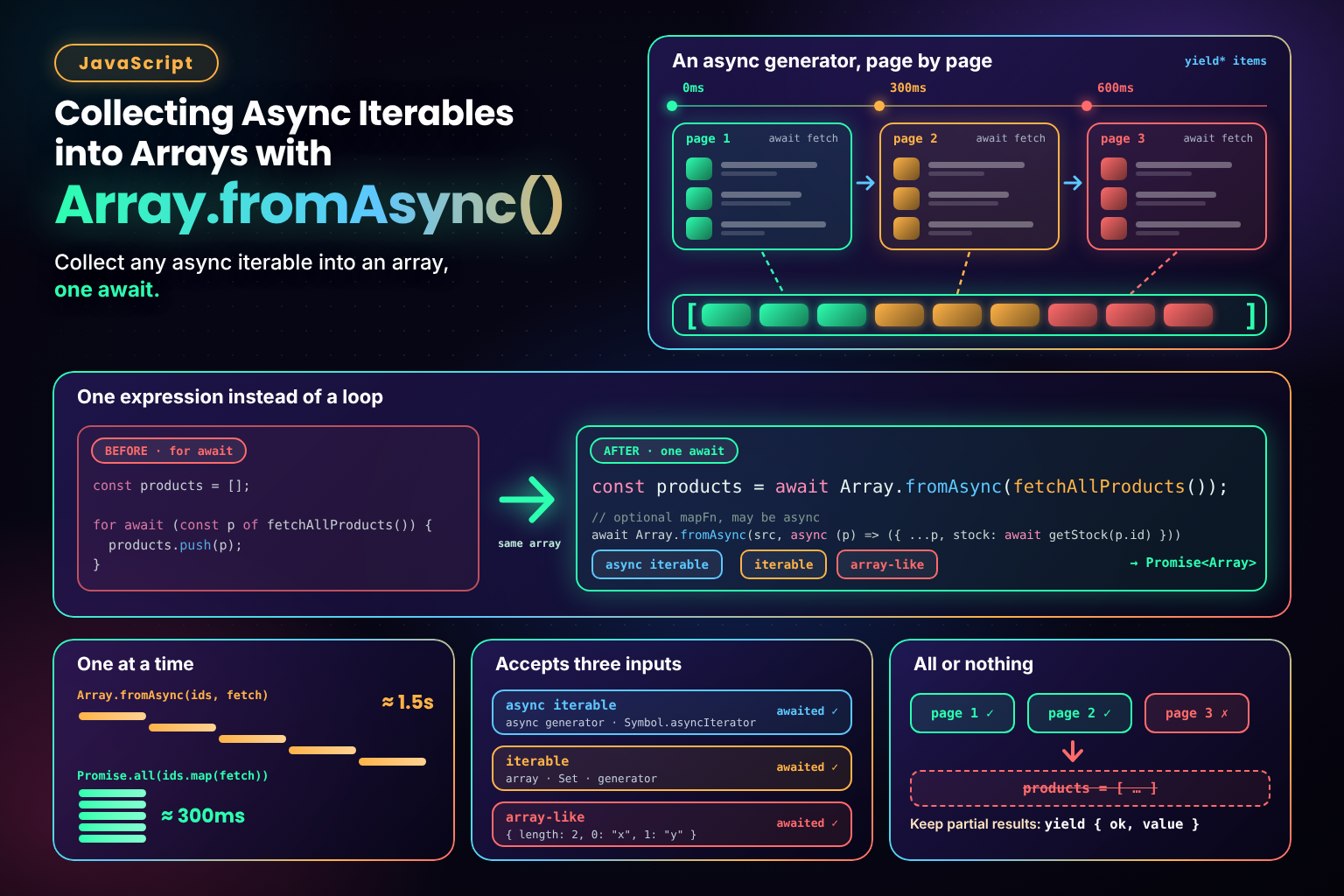
Array.fromAsync() is the async version of Array.from(). Give it an async iterable and it returns a promise
for an array of every value it produced, in order. It also accepts ordinary iterables and array-likes, and awaits
each value in them.
Basic Usage
A common source of async iterables is a paginated API, where each response includes the URL of the next page. An async generator can hide the paging and hand back products one at a time:
async function* fetchAllProducts() {
  let url = "/api/products?page=1";

  while (url) {
    const response = await fetch(url);
    const { items, next } = await response.json();
    yield* items; // hand back this page's products one by one
    url = next;   // null on the last page
  }
}

const products = await Array.fromAsync(fetchAllProducts());
products is a plain array of every product from every page. Array.fromAsync() always returns a promise, so it
has to be awaited, either inside an async function or at the top level of a module.
The Loop It Replaces
const products = [];

for await (const product of fetchAllProducts()) {
  products.push(product);
}
For an async iterable, this loop and Array.fromAsync() produce the same array. The difference is that
Array.fromAsync() says what you mean in one expression, the way Array.from() does for ordinary iterables, and it
leaves no half-filled array behind if something goes wrong.
The Full Signature
Array.fromAsync(items)
Array.fromAsync(items, mapFn)
Array.fromAsync(items, mapFn, thisArg)
What It Accepts
items can be any of three things, checked in this order:
- An async iterable, such as an async generator or any object with a
Symbol.asyncIteratormethod. Values are collected as they arrive. - An ordinary iterable, such as an array, a
Setor a generator. Each value is awaited, so an array containing promises becomes an array of their results. - An array-like object, with a
lengthand numbered keys. Each value is awaited, as with an iterable.
await Array.fromAsync(new Set([1, 2, 3]));                  // [1, 2, 3]
await Array.fromAsync([Promise.resolve("a"), "b"]);         // ["a", "b"]
await Array.fromAsync({ length: 2, 0: "x", 1: "y" });      // ["x", "y"]
Mapping Values
The optional mapFn runs on each value before it's added to the array. It receives the value and its index, and it
can be async: whatever it returns is awaited.
const names = await Array.fromAsync(fetchAllProducts(), (product) => product.name);

const withStock = await Array.fromAsync(fetchAllProducts(), async (product) => ({
  ...product,
  stock: await fetchStock(product.id)
}));
thisArg sets this inside mapFn. It's rarely needed, since an arrow function can use variables from the
surrounding scope instead.
Sequential, Not Concurrent
Array.fromAsync() handles one value at a time. It waits for each value, and for mapFn to finish with it,
before asking for the next. For an async generator that's the only option anyway, since the generator can't produce
page 2 until page 1 has arrived. With an async mapFn, though, it means the work runs one item after another:
const ids = [1, 2, 3, 4, 5];

// One request at a time: about 5 × the time of one request
const slow = await Array.fromAsync(ids, (id) => fetchItem(id));

// All five requests at once: about the time of the slowest one
const fast = await Promise.all(ids.map((id) => fetchItem(id)));
Both produce the same array, in the same order. If each request takes 300ms, the first takes about 1.5 seconds and
the second about 300ms. Running requests one at a time is sometimes what you want, for example to stay under an API's
rate limit, but if the items don't depend on each other, start them together with Promise.all().
Try It Live
Collect all pages collects three pages of products from an async iterable that takes 300ms per page, and the
readout shows when each page arrived. Tick Page 2 fails first to see the whole call reject and the products from
page 1 thrown away with it. Compare timings runs five 300ms requests through Array.fromAsync() with an async
mapper, then through Promise.all(), and shows how long each took.
Collecting a Paginated API with Array.fromAsync()
Collect three pages from an async iterable into one array, make page 2 fail to see the earlier pages discarded, and compare one-at-a-time requests with Promise.all().
<!DOCTYPE html>
<html lang="en">
  <head>
    <meta charset="UTF-8" />
    <meta name="viewport" content="width=device-width, initial-scale=1.0" />
    <title>Array.fromAsync() Playground</title>
  </head>
  <body>
    <main class="playground">
      <header class="playground-header">
        <h1>Collecting a Paginated API with Array.fromAsync()</h1>
        <p>An async iterable hands back one page of products every 300ms, like a paginated API. <code>Array.fromAsync()</code> waits for every page and collects them into one array. Make page 2 fail to see what happens to the pages before it, then compare running five requests one after another with running them all at once.</p>
      </header>

      <p class="tip" id="support-tip" hidden>Your browser doesn't support <code>Array.fromAsync()</code>. It's supported in Chrome and Edge 121, Firefox 115, Safari 16.4 and Node 22 or later.</p>

      <fieldset class="control-group">
        <legend>Paginated API</legend>
        <label class="checkbox-field">
          <input type="checkbox" id="fail-toggle">
          Page 2 fails
        </label>
        <div class="actions">
          <button type="button" class="toggle-btn" id="collect-btn">Collect all pages</button>
        </div>
      </fieldset>

      <fieldset class="control-group">
        <legend>Sequential vs concurrent</legend>
        <p class="hint">Five requests of 300ms each, made with <code>Array.fromAsync(ids, fetchItem)</code> and with <code>Promise.all(ids.map(fetchItem))</code>.</p>
        <div class="actions">
          <button type="button" class="secondary-btn" id="compare-btn">Compare timings</button>
        </div>
      </fieldset>

      <section class="demo-area" aria-label="Collected products">
        <ul class="results" id="results"></ul>
        <p class="empty" id="empty">Nothing collected yet.</p>
      </section>

      <output class="readout" id="readout" aria-live="polite">Press a button to start.</output>
    </main>

    <script src="./index.js"></script>
  </body>
</html>
Starting sandbox…
No console output yet.
Array.fromAsync() vs Promise.all()
Because Array.fromAsync() awaits each value in an array, it can look like a tidier Promise.all(). It isn't a
replacement, and for an array of promises Promise.all() is the better choice.
Array.fromAsync() | Promise.all() | |
|---|---|---|
| Input | Async iterables, iterables, array-likes | Iterables of promises or values |
| Waits on values | One at a time, in order | All at once |
Async mapFn | Runs one call at a time | No mapper: map first, so the calls run at once |
| When a value rejects | Rejects when it reaches that value | Rejects as soon as any value rejects |
| Use it for | Collecting an async sequence | Waiting for work that's already running |
The rejection row matters more than it looks. Given [promiseA, promiseB], Array.fromAsync() doesn't listen to
promiseB until promiseA has settled. If promiseB rejects first, nothing is handling it yet, so the browser
reports an unhandled rejection, and Node, by default, ends the process. Promise.all() listens to every promise
straight away, so it never has that problem.
Error Handling
If the iterable throws, or a value or mapFn rejects, the promise from Array.fromAsync() rejects with that error,
and everything collected so far is thrown away. There's no partial result:
try {
  const products = await Array.fromAsync(fetchAllProducts());
  render(products);
} catch (error) {
  // page 3 failed: pages 1 and 2 are gone too
  showError(error);
}
When mapFn throws, Array.fromAsync() also closes the iterator, so an async generator's finally block runs. That's
the place to release anything the generator was holding, such as a database cursor or a lock.
Keeping Partial Results
If some pages failing shouldn't lose the rest, catch errors inside the generator and yield a result object for every
page instead, the way Promise.allSettled() reports each promise:
async function* fetchPagesSettled(urls) {
  for (const url of urls) {
    try {
      const response = await fetch(url);
      yield { ok: true, value: await response.json() };
    } catch (error) {
      yield { ok: false, error };
    }
  }
}

const results = await Array.fromAsync(fetchPagesSettled(urls));
const pages = results.filter((result) => result.ok).map((result) => result.value);
To give a failed page another chance before giving up on it, wrap the fetch() call in a retry helper such as the
Exponential Backoff Retry Utility.
Stopping Early and Cancelling
Array.fromAsync() keeps going until the iterable is finished; there's no option to stop after a number of items.
The generator decides when it's done, so put the limit there:
async function* fetchAllProducts({ maxPages = 10, signal } = {}) {
  let url = "/api/products?page=1";

  for (let page = 0; url && page < maxPages; page++) {
    const response = await fetch(url, { signal });
    const { items, next } = await response.json();
    yield* items;
    url = next;
  }
}

const controller = new AbortController();
const products = await Array.fromAsync(fetchAllProducts({ maxPages: 5, signal: controller.signal }));
A maxPages limit stops a runaway loop, and passing an AbortSignal to fetch() lets the caller cancel. Calling
controller.abort() rejects the current request, which rejects the whole Array.fromAsync() call.
Collecting a Stream
A ReadableStream, such as response.body, is an async iterable in Chrome and Edge 124, Firefox 110 and Node, and
Safari only added it in version 27. The values it produces are chunks of bytes, not text, so pipe it through a
TextDecoderStream first:
const response = await fetch("/api/report");
const chunks = await Array.fromAsync(response.body.pipeThrough(new TextDecoderStream()));
const text = chunks.join("");
If all you want is the whole body, await response.text() does the same thing in one call and works in every
browser. Collecting a stream with Array.fromAsync() is most useful when the stream has already been transformed into
separate records, such as one parsed object per line.
Browser Support and Fallbacks
Array.fromAsync() is Baseline and widely available. It's supported in Safari 16.4, Firefox 115, Chrome and Edge 121
and Node 22, so every current browser and server runtime has it.
For older targets, either load a polyfill (core-js includes one), or use a small helper built on the loop it replaces:
async function collect(iterable) {
  const values = [];
  for await (const value of iterable) values.push(value);
  return values;
}
Common Pitfalls
1. Forgetting await
Array.fromAsync() returns a promise, not an array. const products = Array.fromAsync(...) followed by
products.map(...) throws, because a promise has no map method.
2. Using It for Concurrency
An async mapFn runs one item at a time. To make several independent requests at once, use
Promise.all(items.map(fn)) instead.
3. Passing an Array of Promises
It works, but a promise that rejects before its turn causes an unhandled rejection. Use Promise.all() or
Promise.allSettled() for promises that are already running.
4. Never-Ending Iterables
An iterable that never finishes, such as a generator that polls for new messages forever, means the promise never
settles. Give the generator an end condition, or consume it with for await...of and stop with break.
5. Expecting Pages to Be Flattened
If the generator yields whole pages (yield items), the result is an array of arrays. Either yield items one by one
with yield* items, or call .flat() on the result.
6. Collecting Too Much
The whole result is kept in memory until the iterable finishes. For a very large sequence, process each value as it
arrives with for await...of instead of collecting them all first.
Where Should You Use This?
- Paginated API clients, where an async generator follows
nextlinks and the caller wants every result - Tests and scripts that need the full output of an async generator to check or save it
- Streams that have been transformed into separate records, such as one parsed object per line
- Anywhere a
for await...ofloop exists only to push values into an array
Reach for something else when the work could run in parallel (Promise.all()), when you need results as they
arrive rather than all at the end (for await...of), or when the sequence might be very large or never end.
Key Takeaway
Array.fromAsync() does for async iterables what Array.from() does for ordinary ones: it collects every value into
an array in one awaited call. It works one value at a time, so use it to collect sequences, such as paginated results,
not to run independent requests, which belong in Promise.all(). Wrap it in try/catch, since a single failure
discards everything collected, and let the generator decide when to stop.
Changelog
- — Initial publication.
Share this tutorial
Spotted a mistake or something outdated in this tutorial? Suggest a correction.