
Native JavaScript Set Methods: union, intersection and difference
 (opens full-size image in a new tab)
Introduction
Which permissions do two users share? Which tags were added since the last save? Does this user hold every role a page requires? Each of these questions compares two collections of unique values, and for years JavaScript's answer was to spread both Sets into arrays, reach for .filter() and .includes(), and build a new Set at the end. That works, but it's wordy, easy to get subtly wrong, and it throws away the very thing that made a Set worth using in the first place.
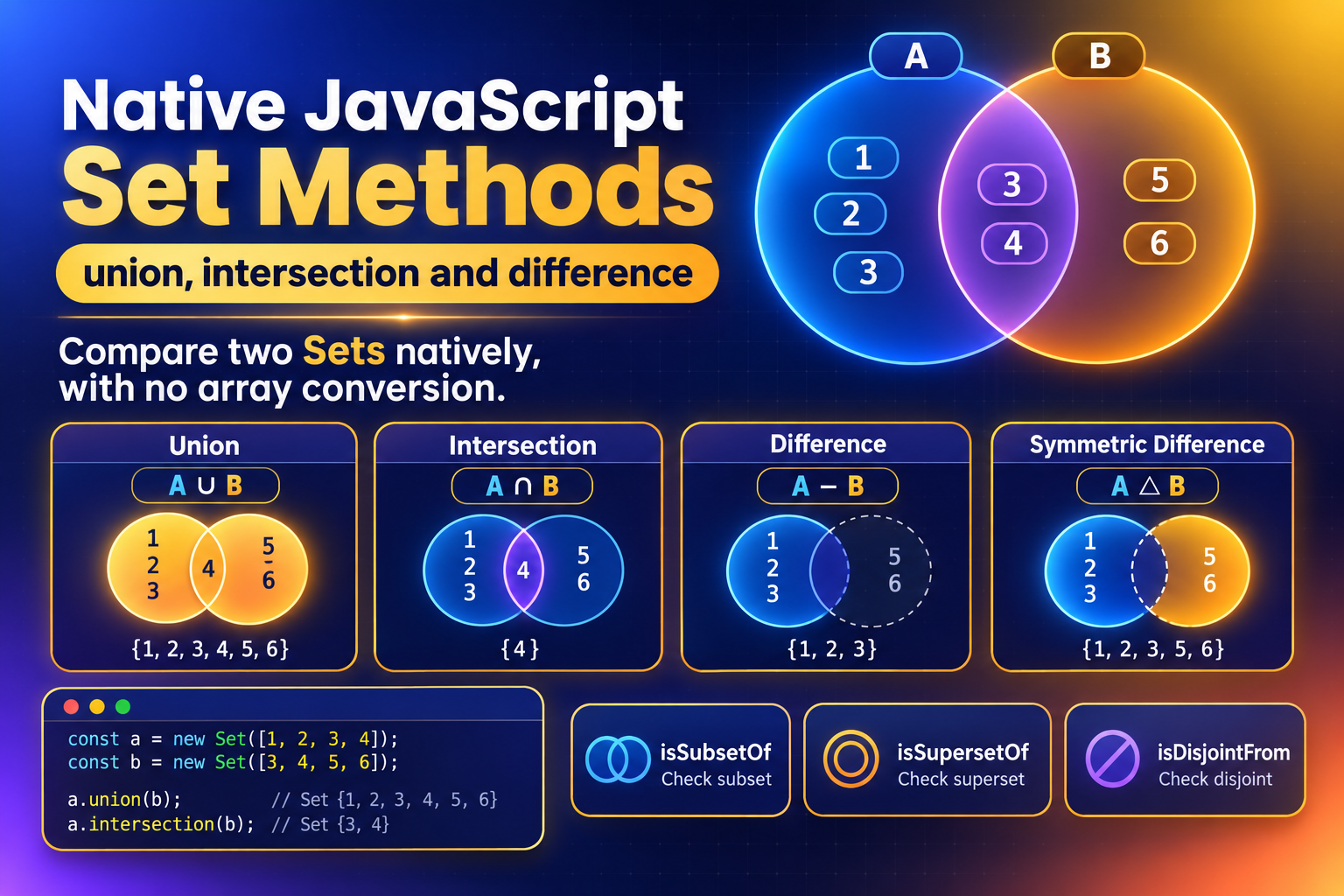
Native set methods answer those questions directly. Seven methods — union, intersection, difference, symmetricDifference, isSubsetOf, isSupersetOf and isDisjointFrom — take a Set in and give a Set (or a boolean) back:
const yourRoles = new Set(["editor", "reviewer", "billing"]);
const required = new Set(["editor", "admin"]);

yourRoles.intersection(required); // Set(1) {"editor"}
required.isSubsetOf(yourRoles);   // false: "admin" is missing
A Quick Refresher on Sets
A Set is a collection of unique values. Adding something it already holds does nothing, and checking whether it holds a value is fast, however large the Set grows:
const tags = new Set(["css", "js", "css"]);

tags.size;        // 2: the duplicate "css" was ignored
tags.has("js");   // true, and quick even with a million entries
tags.add("html"); // adds a value
tags.delete("js"); // removes one
That fast has() check is the key point. An array has to be searched item by item with .includes(), so comparing two large arrays gets slower very quickly. The methods in this tutorial keep working with the Sets themselves, so you keep that speed.
Sets are also a good home for things like a list of subscribers, where each callback should be stored once. The
Mastering JavaScript Observers post builds a small observer that works that way, and
Deep Freeze Objects in JavaScript explains why freezing a Set doesn't stop add(), which these methods avoid by never changing the originals.
Set Algebra in Plain English
These are the same operations a maths lesson or a Venn diagram would name. In every row, a is the Set you call the method on and b is the one you pass in:
| Method | Reads as | Returns |
|---|---|---|
a.union(b) | Everything in either | A new Set |
a.intersection(b) | Only what's in both | A new Set |
a.difference(b) | In a, but not in b | A new Set |
a.symmetricDifference(b) | In exactly one of the two | A new Set |
a.isSubsetOf(b) | Every item of a is in b | true or false |
a.isSupersetOf(b) | Every item of b is in a | true or false |
a.isDisjointFrom(b) | Nothing in common | true or false |
Methods That Return a New Set
The first four build a new Set. The originals are never changed:
const yourRoles = new Set(["editor", "reviewer", "billing"]);
const required = new Set(["editor", "admin"]);

yourRoles.union(required);
// Set(4) {"editor", "reviewer", "billing", "admin"}

yourRoles.intersection(required);
// Set(1) {"editor"}: roles you hold that are required

yourRoles.difference(required);
// Set(2) {"reviewer", "billing"}: yours, but not required

yourRoles.symmetricDifference(required);
// Set(3) {"reviewer", "billing", "admin"}: held by only one side
difference is the only one where the order matters. yourRoles.difference(required) gives what you have that isn't required, while required.difference(yourRoles) gives what's required that you lack, which here is Set {"admin"}. union, intersection and symmetricDifference give the same members whichever way round you call them.
Methods That Answer Yes or No
The last three return a boolean, which makes them a natural fit for if statements:
const small = new Set([1, 2]);
const large = new Set([1, 2, 3, 4]);

small.isSubsetOf(large);   // true: every item of small is in large
large.isSupersetOf(small); // true: the same fact, read from the other side
small.isDisjointFrom(new Set([8, 9])); // true: no overlap at all
isSubsetOf and isSupersetOf are mirror images, so use whichever reads more naturally. A permission check reads best as yourRoles.isSupersetOf(required): "you hold everything required".
The Array Detour These Replace
Before these methods, every operation needed its own hand-written pipeline:
const union = new Set([...a, ...b]);

const intersection = new Set([...a].filter((item) => b.has(item)));

const difference = new Set([...a].filter((item) => !b.has(item)));

const symmetricDifference = new Set([
  ...[...a].filter((item) => !b.has(item)),
  ...[...b].filter((item) => !a.has(item))
]);

const isSubset = [...a].every((item) => b.has(item));
Each of these is a slightly different mix of spread, filter and has, and they're easy to mix up: difference and intersection differ by a single !. The native versions say what they mean in their name, so the code is shorter and a reviewer doesn't have to work out which pipeline they're looking at.
Try It Live
Tick the roles you hold and the roles a page requires, then choose a method. The result updates straight away, with a one-line explanation under the picker and the exact call, with both input sets, in the readout at the bottom. Try these:
- Untick everything in Your roles and choose
isSubsetOfto see the empty-set rule. - Choose
difference, then compare it withsymmetricDifferenceto see which side's items each one keeps. - Choose
isSupersetOfand tickadminunder Yours to watch the permission check flip fromfalsetotrue.
In a browser without the new methods, the playground uses the array fallback described below, and a note says so.
Set Methods Playground
Tick the roles you hold and the roles a page requires, then run any of the seven native Set methods on them, with a plain-English reading of each result and an array fallback where the methods are missing.
<!DOCTYPE html>
<html lang="en">
  <head>
    <meta charset="UTF-8" />
    <meta name="viewport" content="width=device-width, initial-scale=1.0" />
    <title>Set Methods Playground</title>
  </head>
  <body>
    <main class="playground">
      <header class="playground-header">
        <h1>Comparing Two Sets of Roles</h1>
        <p>Tick the roles you hold and the roles a page requires, then pick a method. Every result comes from one native <code>Set</code> method call, with no array conversion.</p>
      </header>

      <p class="support-note" id="support-note" hidden>This browser doesn't support the new <code>Set</code> methods yet, so the results use the array fallback from the tutorial. The answers are identical, but the code underneath is the spread-and-filter pattern the native methods replace.</p>

      <div class="fields-grid">
        <fieldset class="control-group">
          <legend>Your roles</legend>
          <div class="chip-list" id="your-roles"></div>
        </fieldset>

        <fieldset class="control-group">
          <legend>Required for this page</legend>
          <div class="chip-list" id="required-roles"></div>
        </fieldset>
      </div>

      <fieldset class="control-group">
        <legend>Method</legend>
        <div class="segmented-control" role="radiogroup" aria-label="Set method" id="method-picker"></div>
        <p class="tip" id="tip"></p>
      </fieldset>

      <section class="demo-area result-area" aria-live="polite">
        <p class="result-label" id="result-label"></p>
        <div class="chip-list" id="result"></div>
      </section>

      <output class="readout" id="readout"></output>
    </main>

    <script src="./index.js"></script>
  </body>
</html>
Starting sandbox…
No console output yet.
Real-World Patterns
Permission Checks
const canOpen = (userRoles, requiredRoles) => userRoles.isSupersetOf(requiredRoles);

canOpen(new Set(["editor", "admin"]), new Set(["admin"])); // true
canOpen(new Set(["editor"]), new Set(["admin"]));          // false
This replaces an .every() and .includes() combination with a single call that states the intent.
Diffing Two Lists of IDs
Comparing the previous state with the next gives you everything a sync or an undo needs:
const previous = new Set([1, 2, 3, 4]);
const next = new Set([3, 4, 5]);

const added = next.difference(previous);        // Set {5}
const removed = previous.difference(next);      // Set {1, 2}
const unchanged = previous.intersection(next);  // Set {3, 4}
Filtering by Tags
To find the items that carry every selected tag, or any of them:
const selected = new Set(["css", "animation"]);

const matchesAll = (item) => item.tags.isSupersetOf(selected);
const matchesAny = (item) => !item.tags.isDisjointFrom(selected);
This assumes each item.tags is a Set. If yours are arrays, wrap them once with new Set(item.tags) when you load the data, not on every filter pass.
Arguments, Order and Edge Cases
The Argument Must Be Set-Like, Not an Array
The Set you call the method on must be a real Set, but the argument only has to be set-like: an object with a numeric size, a has() method and a keys() method. A Map qualifies, and its keys are used:
const allowed = new Set(["a", "b", "c"]);
const prices = new Map([["a", 1], ["b", 2]]);

allowed.intersection(prices); // Set(2) {"a", "b"}: compared against the Map's keys
An array is not set-like, because it has no size or has(), so passing one throws a TypeError:
allowed.union(["d", "e"]);             // TypeError
allowed.union(new Set(["d", "e"]));    // Set(5) {"a", "b", "c", "d", "e"}
Wrap the array in new Set(...) first.
Values Are Compared the Same Way as Always
Primitives are compared by value and objects by reference, exactly as Set has always worked. Two different objects that look identical are different members:
const a = new Set([{ id: 1 }]);
const b = new Set([{ id: 1 }]);

a.intersection(b); // Set(0) {}: two separate objects
If you need to compare objects by content, compare a primitive key such as the id instead.
Order Isn't a Promise
union returns the items of the first Set followed by the new items from the second. For intersection, the order can follow either set, depending on which is smaller, so don't rely on it. If the order matters, sort the result: [...result].sort().
A Set Is Not an Array
The result is a Set, so it has no .map() or .sort(). Spread it ([...result]) or use Array.from(result) when you need array methods.
Browser Support and Fallbacks
These methods became available in all major browsers in mid-2024: Chrome and Edge 122, Firefox 127 and Safari 17. They're also in Node.js 22, and are part of ES2025. That's wide enough for most projects, but older browsers and older Node.js versions will throw TypeError: a.union is not a function.
Detect the feature rather than the browser:
const hasSetMethods = typeof Set.prototype.union === "function";You have two ways to cover older environments. The simplest is a polyfill such as core-js, which adds all seven methods so the rest of your code stays the same:
import "core-js/actual/set";The other is a small helper that uses the native method when it exists and the array pattern when it doesn't:
const intersection = (a, b) =>
  typeof a.intersection === "function"
    ? a.intersection(b)
    : new Set([...a].filter((item) => b.has(item)));
The playground above does exactly this, with one fallback per method.
Common Pitfalls
1. Passing an Array
new Set([1, 2]).union([3]) throws a TypeError. Wrap it: .union(new Set([3])).
2. Expecting the Original to Change
All seven methods leave both Sets untouched. To keep a result, assign it: roles = roles.union(extra). If you want to change a Set in place, use add() and delete() as before.
3. Swapping difference Around
a.difference(b) and b.difference(a) are different questions. If you want both directions at once, that's symmetricDifference.
4. Comparing Objects by Content
Two objects with the same contents are different members. Compare a stable primitive such as an id.
5. Forgetting Older Runtimes
A Node.js version older than 22, or a browser from before mid-2024, won't have these methods. Check your support targets, then use a polyfill or the helper above.
Key Takeaway
union, intersection, difference, symmetricDifference, isSubsetOf, isSupersetOf and isDisjointFrom replace a family of hand-written spread-and-filter pipelines with calls that say exactly what they do, and they keep your data in a Set throughout. Pass them a Set or another set-like object, never an array, and add a polyfill if you still support browsers from before mid-2024.
Changelog
- — Initial publication.
Share this tutorial
Spotted a mistake or something outdated in this tutorial? Suggest a correction.