
git sync: Update Your Branch from main in One Command
 (opens full-size image in a new tab)
Introduction
Keeping a feature branch current usually takes four or five commands: stash your changes, switch to main, pull, switch back, rebase, pop the stash — and hope nothing conflicts along the way. Skip a step and you end up rebasing onto a stale main, or pulling into the wrong branch.
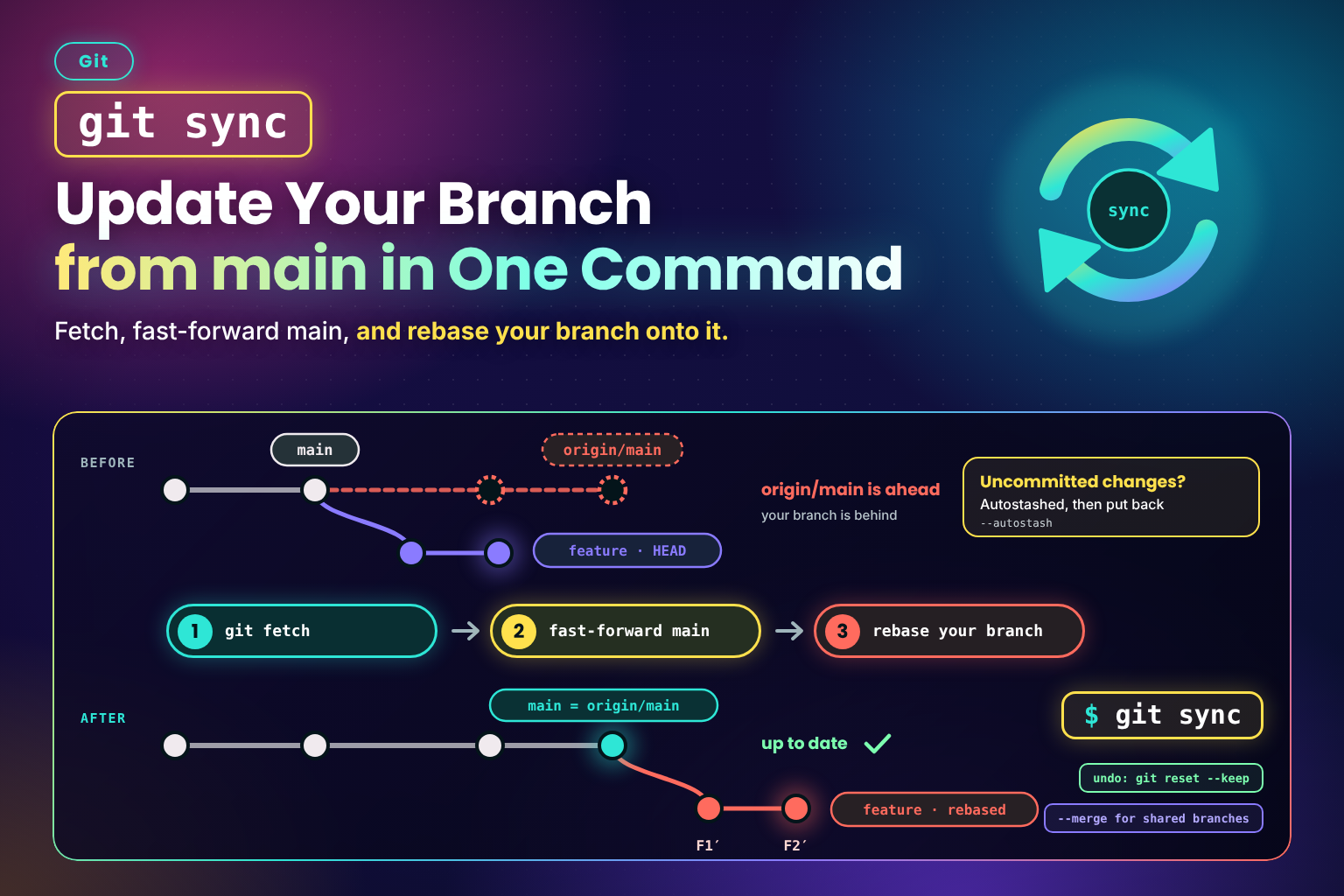
This snippet wraps the whole routine in a single git sync command. It fetches, fast-forwards your local default branch without checking it out, rebases (or merges) the current branch onto it, and tells you exactly how to undo or push the result.
The Script
#!/usr/bin/env bash
# Bring the current branch up to date in one step: fetch, fast-forward the
# default branch, then rebase (or merge) the current branch onto it.
#
# Usage: git sync [-m] [base]    (see -h)
set -euo pipefail

usage() {
  cat <<'EOF'
Usage: git sync [options] [base]

Fetch, fast-forward the local <base> branch, then rebase the current branch
onto it. <base> defaults to the remote's default branch (else main or master).

Options:
  -m, --merge    Merge <base> into the current branch instead of rebasing
  -h             Show this help (git sync --help opens Git's man page instead)
EOF
}

die() {
  printf 'git sync: %s\n' "$*" >&2
  exit 1
}

mode=rebase
base=

while [ $# -gt 0 ]; do
  case $1 in
    -m | --merge) mode=merge ;;
    -h | --help) usage; exit 0 ;;
    -*) die "unknown option '$1' (see -h)" ;;
    *)
      [ -z "$base" ] || die "unexpected argument '$1' (see -h)"
      base=$1
      ;;
  esac
  shift
done

git rev-parse --is-inside-work-tree >/dev/null 2>&1 || die "not inside a Git work tree"

# Checked before the branch: a stopped rebase also detaches HEAD, and that's the real problem.
git_dir=$(git rev-parse --git-dir)
for marker in rebase-merge rebase-apply MERGE_HEAD CHERRY_PICK_HEAD REVERT_HEAD BISECT_LOG; do
  [ ! -e "$git_dir/$marker" ] || die "a rebase, merge, cherry-pick, revert or bisect is in progress; finish it first"
done

branch=$(git symbolic-ref --quiet --short HEAD) || die "HEAD is detached; check out a branch first"

remote=$(git config --get "branch.$branch.remote" || echo origin)
[ "$remote" != . ] || remote=origin
git remote get-url "$remote" >/dev/null 2>&1 || die "no such remote '$remote'"
git fetch --prune --quiet "$remote" || die "fetch from '$remote' failed"

if [ -z "$base" ]; then
  base=$(git symbolic-ref --quiet --short "refs/remotes/$remote/HEAD" 2>/dev/null || true)
  base=${base#"$remote"/}
  if [ -z "$base" ]; then
    for candidate in main master; do
      if git rev-parse --quiet --verify "refs/remotes/$remote/$candidate" >/dev/null; then
        base=$candidate
        break
      fi
    done
  fi
  [ -n "$base" ] ||
    die "can't tell the default branch of '$remote'; run 'git remote set-head $remote --auto' or pass a base"
fi

# In a fork, the base usually tracks another remote (e.g. upstream) — sync against that one.
base_remote=$(git config --get "branch.$base.remote" || echo "$remote")
[ "$base_remote" != . ] || base_remote=$remote
if [ "$base_remote" != "$remote" ]; then
  git remote get-url "$base_remote" >/dev/null 2>&1 || die "no such remote '$base_remote'"
  git fetch --prune --quiet "$base_remote" || die "fetch from '$base_remote' failed"
fi

upstream="refs/remotes/$base_remote/$base"
target="$base_remote/$base"
git rev-parse --quiet --verify "$upstream" >/dev/null || die "no such branch '$target'"

# Fast-forward the local base without checking it out. A non-fast-forward
# means local commits on base that aren't on the remote — never discard those.
if [ "$branch" = "$base" ]; then
  git merge --ff-only --autostash --quiet "$upstream" ||
    die "'$base' has diverged from '$target'; resolve it by hand"
  echo "'$base' is up to date with '$target'."
  exit 0
fi

if git rev-parse --quiet --verify "refs/heads/$base" >/dev/null; then
  if git worktree list --porcelain | grep -qxF "branch refs/heads/$base"; then
    # Moving a branch under another worktree would leave its files stale;
    # rebasing onto the remote-tracking ref below is still correct.
    echo "note: '$base' is checked out in another worktree; not updating it." >&2
  elif git merge-base --is-ancestor "refs/heads/$base" "$upstream"; then
    git update-ref "refs/heads/$base" "$upstream" "$(git rev-parse "refs/heads/$base")"
  else
    echo "warning: local '$base' has commits not on '$target'; leaving it alone." >&2
  fi
fi

before=$(git rev-parse HEAD)
if [ "$mode" = merge ]; then
  git merge --autostash --no-edit "$target" ||
    die "merge stopped on conflicts; fix them and 'git commit', or 'git merge --abort'"
else
  git rebase --autostash "$upstream" ||
    die "rebase stopped on conflicts; fix them and 'git rebase --continue', or 'git rebase --abort'"
fi

if [ "$(git rev-parse HEAD)" = "$before" ]; then
  echo "'$branch' is already up to date with '$target'."
else
  # --keep (not --hard) so the undo never wipes the uncommitted changes autostash put back.
  echo "Synced '$branch' onto '$target'. Undo with: git reset --keep $before"
  if [ "$mode" = rebase ] && git rev-parse --quiet --verify "refs/remotes/$remote/$branch" >/dev/null; then
    echo "History was rewritten — push with 'git push --force-with-lease' (or 'git fix-dates')."
  fi
fi
Installation
Git treats any executable named git-<name> on your PATH as a subcommand, so saving the file as git-sync is all it takes for git sync to work. It needs Git 2.27 or newer for git merge --autostash (check with git --version):
mkdir -p ~/.local/bin
# Save the script above as ~/.local/bin/git-sync, then:
chmod +x ~/.local/bin/git-sync

# Make sure ~/.local/bin is on your PATH (add this to ~/.bashrc or ~/.zshrc)
export PATH="$HOME/.local/bin:$PATH"

git sync -h
Use -h rather than --help here: Git turns git <command> --help into a man-page lookup, so git sync --help never reaches the script.
Usage
git sync            # Rebase the current branch onto the latest default branch
git sync --merge    # Merge it in instead, for shared branches you mustn't rewrite
git sync develop    # Sync against a branch other than the default
$ git sync
Created autostash: 783582b
Applied autostash.
Successfully rebased and updated refs/heads/feat/search-index.
Synced 'feat/search-index' onto 'origin/main'. Undo with: git reset --keep 03432c8e5b1f9a7d24c6e80b3f15a9d7c2e4b618
History was rewritten — push with 'git push --force-with-lease' (or 'git fix-dates').How It Works
- Preflight checks: no rebase, merge, cherry-pick, revert, or bisect already half-finished, and on a real branch.
- Fetches with
--prune, so the remote-tracking refs are current. The default branch comes fromorigin/HEAD(set when you clone), falling back tomain, thenmaster. - Picks the right remote for the base. In a fork, where your local
maintracksupstreamrather thanorigin, it fetches and syncs againstupstream/main. - Fast-forwards the local default branch in place with
git update-ref, guarded by its old value — no checkout needed. If your localmainhas commits that aren't on the remote, or is checked out in another worktree, it's left alone with a note instead of being moved. - Rebases onto the remote-tracking ref (
origin/main), not the local branch, so the result is correct even if the localmaincouldn't be updated. - Autostashes uncommitted changes around the rebase or merge and puts them back afterwards.
- Stops cleanly on conflicts with the exact next command to continue or abort, and prints an undo command on success.
Rebase or Merge?
- Rebase (default) keeps a linear history and is ideal for your own feature branches. It rewrites commits, so a branch that's already pushed needs a force-push —
git syncreminds you when that's the case. --mergenever rewrites existing commits, so it's the right choice for a branch other people are also committing to.
Notes & Tips
- Turn on
rerere. Withgit config --global rerere.enabled true, Git remembers how you resolved a conflict and replays it the next time the same conflict appears — a big help when you sync often. - Undo keeps your edits. The printed undo uses
git reset --keep, not--hard, so uncommitted changes survive it. If one of them touches a file the sync changed, Git refuses rather than overwrite it — commit or stash that change first. - No
origin/HEAD? Repos created withgit remote addinstead ofgit clonedon't have one. The script falls back tomainormaster; for anything else, rungit remote set-head origin --autoonce, or pass the base explicitly. - Worktrees are safe. If the default branch is checked out in another worktree, the script leaves it untouched — so that worktree's files never go stale — and still rebases onto
origin/maincorrectly. - Follow up with
git prune-branchesonce your branches start landing. - Pair it with aliases. A short alias like
pushffrom Git Aliases Worth Adding to Your~/.gitconfigmakes the force-push after a rebase sync one command too.
Key Takeaway
git sync turns "update my branch with the latest main" into one command that never discards local commits on the base branch, protects uncommitted work, and always leaves you a clear way to continue, abort, or undo.
Changelog
- — Initial publication.
Share this snippet
Spotted a mistake or something outdated in this snippet? Suggest a correction.