
git prune-branches: Delete Merged and Squash-Merged Branches
 (opens full-size image in a new tab)
Introduction
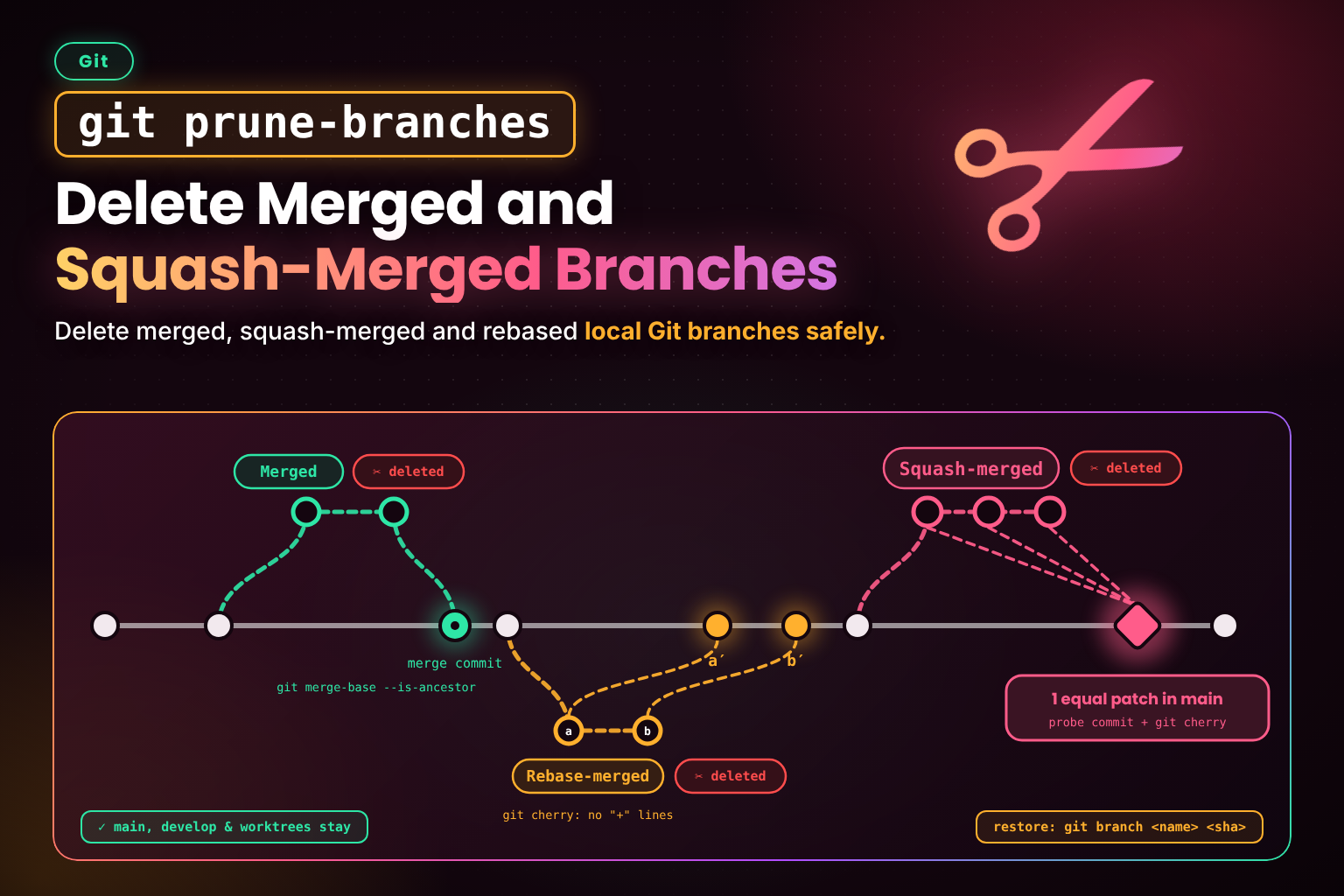
A few months into any project, git branch turns into a graveyard: dozens of feature branches that were merged long ago and never deleted locally. The usual fix, git branch --merged | xargs git branch -d, misses the biggest category of all — branches merged on GitHub with "Squash and merge" or "Rebase and merge", whose commits never appear in main's history.
This snippet is a git prune-branches command that finds branches that are merged, squash-merged or rebase-merged into the default branch, protects anything you're still using, shows you the list, and prints a one-line restore command for every branch it deletes.
The Script
#!/usr/bin/env bash
# Delete local branches that are already merged (including squash- and
# rebase-merged) into the default branch, so `git branch` only lists work
# still in flight.
#
# Usage: git prune-branches [-n] [-y] [--gone] [--no-fetch] [base]    (see -h)
set -euo pipefail

usage() {
  cat <<'EOF'
Usage: git prune-branches [options] [base]

Delete local branches already merged into <base>, including ones merged via
"Squash and merge" or "Rebase and merge". <base> defaults to the remote's
default branch.

Options:
  -n, --dry-run    List what would be deleted and exit
  -y, --yes        Skip the confirmation prompt (required when not on a TTY)
      --gone       Also delete unmerged branches whose upstream was deleted
      --no-fetch   Don't fetch (and prune) the remote first
  -h, --help       Show this help
EOF
}

die() {
  printf 'git prune-branches: %s\n' "$*" >&2
  exit 1
}

dry_run=false
assume_yes=false
include_gone=false
fetch=true
base=

while [ $# -gt 0 ]; do
  case $1 in
    -n | --dry-run) dry_run=true ;;
    -y | --yes) assume_yes=true ;;
    --gone) include_gone=true ;;
    --no-fetch) fetch=false ;;
    -h | --help) usage; exit 0 ;;
    -*) die "unknown option '$1' (see -h)" ;;
    *)
      [ -z "$base" ] || die "unexpected argument '$1' (see -h)"
      base=$1
      ;;
  esac
  shift
done

git rev-parse --is-inside-work-tree >/dev/null 2>&1 || die "not inside a Git work tree"
current=$(git symbolic-ref --quiet --short HEAD || true)

remote=$(git config --get "branch.${current:-main}.remote" || echo origin)
if $fetch && git remote get-url "$remote" >/dev/null 2>&1; then
  git fetch --prune --quiet "$remote" || die "fetch from '$remote' failed (use --no-fetch to skip)"
fi

# Compare against the remote's branch, since local main may be behind. <remote>/HEAD
# is only set by `git clone` (or `git remote set-head`), so fall back by name.
if [ -z "$base" ]; then
  base=$(git symbolic-ref --quiet --short "refs/remotes/$remote/HEAD" 2>/dev/null || true)
  for fallback in "refs/remotes/$remote/main" "refs/remotes/$remote/master" refs/heads/main refs/heads/master; do
    [ -n "$base" ] && break
    git rev-parse --quiet --verify "$fallback" >/dev/null && base=$(git rev-parse --abbrev-ref "$fallback")
  done
  [ -n "$base" ] || die "can't detect the default branch; pass it explicitly"
fi
git rev-parse --quiet --verify "$base^{commit}" >/dev/null || die "no such branch or commit '$base'"

# Never delete the base, long-lived branches, or anything checked out in a worktree.
protected=$'\n'"${base#"$remote"/}"$'\n'main$'\n'master$'\n'develop$'\n'
while read -r key ref; do
  [ "$key" = branch ] && protected+="${ref#refs/heads/}"$'\n'
done < <(git worktree list --porcelain)

merged=() squashed=() gone=()
while IFS='|' read -r branch track; do
  case $protected in *$'\n'"$branch"$'\n'*) continue ;; esac

  if git merge-base --is-ancestor "refs/heads/$branch" "$base"; then
    merged+=("$branch")
    continue
  fi

  # Rebase-merge check: every commit on the branch already has an equivalent
  # in base. (sed reads all the output, so pipefail can't trip on SIGPIPE.)
  if [ -z "$(git cherry "$base" "refs/heads/$branch" | sed -n '/^+/p')" ]; then
    squashed+=("$branch")
    continue
  fi

  # Squash-merge check: build a throwaway commit holding the branch's whole
  # diff, then ask `git cherry` whether an equivalent patch is already in base.
  fork=$(git merge-base "$base" "refs/heads/$branch" || true)
  if [ -n "$fork" ]; then
    probe=$(git commit-tree "refs/heads/$branch^{tree}" -p "$fork" -m probe)
    if [ "$(git cherry "$base" "$probe")" = "- $probe" ]; then
      squashed+=("$branch")
      continue
    fi
  fi

  [ "$track" = "[gone]" ] && gone+=("$branch")
done < <(git for-each-ref --format='%(refname:short)|%(upstream:track)' refs/heads/)

# The ${a[@]+...} form keeps empty arrays safe under `set -u` on bash 3.2 (macOS).
doomed=(${merged[@]+"${merged[@]}"} ${squashed[@]+"${squashed[@]}"})
$include_gone && doomed+=(${gone[@]+"${gone[@]}"})

list() {
  local label=$1; shift
  [ $# -eq 0 ] && return
  echo "$label:"
  printf '  %s\n' "$@"
}

list "Merged into $base" ${merged[@]+"${merged[@]}"}
list "Squash- or rebase-merged into $base" ${squashed[@]+"${squashed[@]}"}
if $include_gone; then
  list "Upstream deleted (unmerged work will be lost)" ${gone[@]+"${gone[@]}"}
elif [ ${#gone[@]} -gt 0 ]; then
  list "Kept — upstream deleted but not merged (use --gone to delete)" ${gone[@]+"${gone[@]}"}
fi

if [ ${#doomed[@]} -eq 0 ]; then
  echo "Nothing to prune."
  exit 0
fi
$dry_run && exit 0

if ! $assume_yes; then
  [ -t 0 ] || die "refusing to delete branches non-interactively without --yes"
  read -r -p "Delete ${#doomed[@]} branch(es)? [y/N] " reply
  case $reply in [yY] | [yY][eE][sS]) ;; *) die "aborted" ;; esac
fi

# -D is needed for squash- and rebase-merged branches; print each tip so any can be restored.
for branch in ${doomed[@]+"${doomed[@]}"}; do
  sha=$(git rev-parse --short "refs/heads/$branch")
  git branch --quiet -D "$branch"
  echo "Deleted $branch (restore: git branch $branch $sha)"
done
Installation
Git treats any executable named git-<name> on your PATH as a subcommand, so saving the file as git-prune-branches is all it takes for git prune-branches to work. It needs only Git and bash 3.2 or newer, so the bash that ships with macOS is fine:
mkdir -p ~/.local/bin
# Save the script above as ~/.local/bin/git-prune-branches, then:
chmod +x ~/.local/bin/git-prune-branches

# Make sure ~/.local/bin is on your PATH (add this to ~/.bashrc or ~/.zshrc)
export PATH="$HOME/.local/bin:$PATH"

git prune-branches -h
Use -h rather than --help here: Git turns git <command> --help into a man-page lookup, so git prune-branches --help never reaches the script.
Usage
git prune-branches -n          # Dry run: list what would go, delete nothing
git prune-branches             # Fetch, list, confirm, delete
git prune-branches --gone      # Also delete branches whose remote branch was deleted
git prune-branches develop     # Compare against a branch other than the default
git prune-branches --no-fetch  # Work offline from the last fetch
$ git prune-branches
Merged into origin/main:
fix/header-overlap
feat/rss-feed
Squash- or rebase-merged into origin/main:
feat/search-index
Kept — upstream deleted but not merged (use --gone to delete):
spike/view-transitions
Delete 3 branch(es)? [y/N] y
Deleted fix/header-overlap (restore: git branch fix/header-overlap c1b4b57)
Deleted feat/rss-feed (restore: git branch feat/rss-feed 0313a32)
Deleted feat/search-index (restore: git branch feat/search-index 84e14d9)How It Works
- Fetches with
--pruneso remote-tracking branches deleted on GitHub disappear locally andorigin/mainis up to date. The base isorigin/HEADif your clone has it, otherwiseorigin/mainororigin/master— the remote copy, because your localmainmay be behind. - Protects the base branch,
main,master,develop, and every branch checked out in any worktree — including the one you're on. - Regular merges are detected with
git merge-base --is-ancestor: the branch tip is already reachable from the base. - Rebase merges are detected with
git cherry, which lists each commit on the branch that has no equivalent in the base. If it lists none, every commit has already landed under a new hash. - Squash merges are detected with a throwaway commit. It builds a single commit containing the branch's entire diff since it forked, then asks
git cherrywhether an equivalent patch already exists in the base. A leading-means it does. - Gone branches — upstream deleted on the remote, but not merged — are listed and kept unless you pass
--gone, because they may hold work that was never merged anywhere. - Deletes with
git branch -D(squash- and rebase-merged branches aren't ancestors, so-dwould refuse) and prints each branch's tip so any deletion is one command to undo.
Notes & Tips
- Restore is always available. Use the printed
git branch <name> <sha>, or find the tip later withgit reflog. - Squash detection needs a clean match. If
mainchanged lines next to the branch's edits before the squash (say, while resolving a conflict), or the squash commit was amended, the patches differ and the branch is kept — the safe direction to fail in. - New, empty branches count as merged. A branch you've just created but not committed to points at a commit already in
main, so it's listed for deletion — just asgit branch --mergedwould list it. Nothing is lost, but check the dry run first. - Missing
origin/HEAD? Repos created withgit initandgit remote adddon't have it. Rungit remote set-head origin --autoonce to set it, or pass the base branch explicitly. - Remote branches aren't touched. This only deletes local branches; enable GitHub's "Automatically delete head branches" setting to clean up the remote side.
- Add your own protected names by extending the
protectedlist (for examplerelease,staging). - Run it after
git sync— sync your branch once its pull request has merged, then prune what landed. - Pairs well with Git Aliases Worth Adding to Your
~/.gitconfig— once an alias needs options and safety checks, it's time for agit-<name>script like this one orgit fix-dates.
Frequently Asked Questions
Key Takeaway
git prune-branches clears out every branch that has truly landed, including the squash- and rebase-merged ones a plain git branch --merged never sees, while keeping unmerged work, protected branches, and worktree checkouts out of harm's way.
Changelog
- — Added cross-reference to snippet '`git sync`: Update Your Branch from `main` in One Command'
- — Initial publication.
Share this snippet
Spotted a mistake or something outdated in this snippet? Suggest a correction.