
Git Aliases Worth Adding to Your ~/.gitconfig
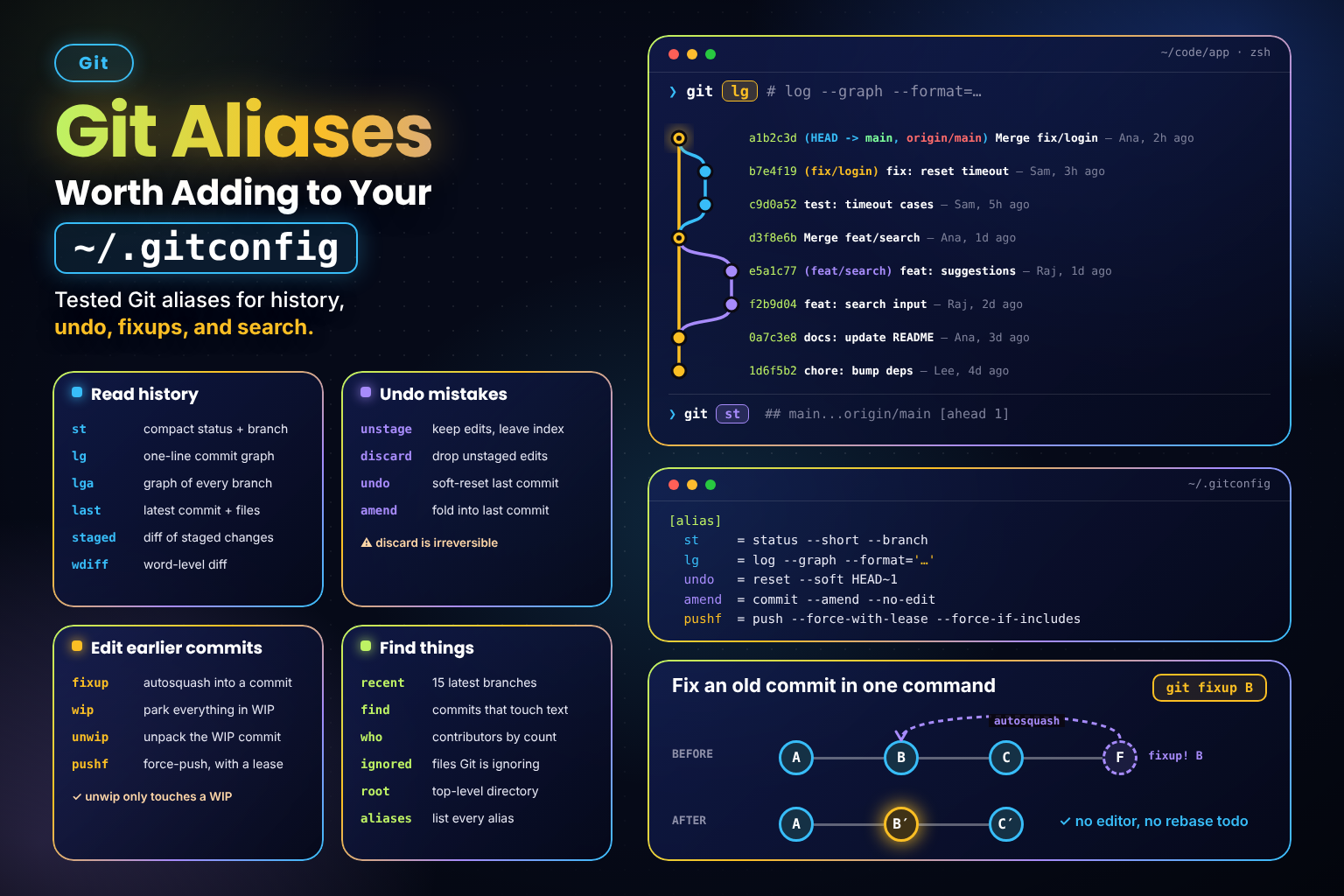 (opens full-size image in a new tab)
Introduction
Git's built-in commands are powerful but verbose — nobody wants to type log --graph --format='%C(auto)%h%d %s' twenty times a day. Aliases let you name the incantations you use most, and because they live in ~/.gitconfig, they follow you to every repository.
This snippet is a curated, tested set of aliases for everyday work: reading history, undoing mistakes, fixing up earlier commits, and finding things.
The Aliases
Paste this into ~/.gitconfig. If you already have an [alias] section, that's fine — Git merges them.
[alias]
  st = status --short --branch
  lg = log --graph --format='%C(auto)%h%d %s %C(dim)— %an, %ar%C(reset)'
  lga = lg --all
  last = log -1 HEAD --stat
  staged = diff --cached
  wdiff = diff --word-diff=color
  unstage = restore --staged --
  discard = restore --
  undo = reset --soft HEAD~1
  amend = commit --amend --no-edit
  fixup = "!f() { target=$(git rev-parse --verify \"$1^{commit}\") || return; base=$(git rev-parse --quiet --verify \"$target~1\") || base=--root; git commit --fixup=\"$target\" && GIT_SEQUENCE_EDITOR=: git rebase --interactive --autosquash --autostash $base; }; f"
  wip = "!git add --all && git commit --quiet --no-verify -m WIP"
  unwip = "!git log -1 --format=%s | grep -qx WIP && git reset --quiet HEAD~1"
  pushf = push --force-with-lease --force-if-includes
  recent = for-each-ref --sort=-committerdate --count=15 --format='%(committerdate:relative)%09%(refname:short)' refs/heads/
  find = log --all --oneline -S
  who = shortlog --summary --numbered --email --no-merges HEAD
  ignored = ls-files --others --ignored --exclude-standard
  root = rev-parse --show-toplevel
  aliases = "!git config --get-regexp '^alias\\.' | sed 's/^alias\\.//'"
Prefer to keep them in their own file? Save the block as ~/.gitconfig.aliases and include it from ~/.gitconfig:
[include]
  path = ~/.gitconfig.aliases
Either way, run git aliases afterwards — if the list prints, everything loaded.
What Each One Does
Reading history and status
git st— compact status with the branch and ahead/behind counts on the first line.git lg/git lga— one-line coloured graph of the current branch, or of every branch.git last— the latest commit with a per-file summary of what changed.git staged— what's about to be committed (the diffgit diffalone won't show you).git wdiff— word-level diff, far easier to read for prose and Markdown.
Undoing things
git unstage <file>— take a file out of the staging area, keeping your edits.git discard <file>— throw away unstaged edits to a file. Irreversible.git undo— remove the last commit but keep its changes staged, ready to recommit.git amend— fold staged changes into the last commit without reopening the editor.
Editing earlier commits
git fixup <commit>— commit what's staged as a fix to<commit>and immediately autosquash it in, no editor involved. Works on the very first commit too. If the rebase stops on a conflict, resolve it and rungit rebase --continue, or back out withgit rebase --abort. For several fixes at once, the third-partygit absorbpicks the target commits for you.git wip/git unwip— park everything (including untracked files) in a throwawayWIPcommit, then unpack it again.unwipdoes nothing unless the last commit is literallyWIP, so it can't eat a real commit.git pushf— the safe force-push: refuses if the remote has commits you haven't fetched and integrated. Reach for it afterfixuporamendrewrites a commit you'd already pushed.
Finding things
git recent— your 15 most recently touched branches, newest first.git find <text>— every commit, on any branch, that added or removed<text>.git who— contributors ranked by commit count.git ignored— files Git is ignoring, handy when a.gitignorerule catches too much.git root— the repository's top-level directory, e.g.cd "$(git root)".git aliases— list everything above, so you never have to open the config to remember.
Adding Them From the Command Line
Prefer not to edit the file by hand? Simple aliases can be set with git config:
git config --global alias.st 'status --short --branch'
git config --global alias.undo 'reset --soft HEAD~1'
git config --global alias.pushf 'push --force-with-lease --force-if-includes'
Shell aliases (the ones starting with !) are possible this way too, but their nested quoting gets awkward on the command line — paste those into the file instead.
Notes & Tips
!means shell. An alias starting with!runs as a shell command instead of a Git subcommand, which is howfixup,wip, andaliaseschain several commands together. Shell aliases always run from the repository root.- The
f() { …; }; fpattern wraps a shell alias in a function so arguments like$1land exactly where you want them. - Aliases can call aliases.
lgais justlg --all. - Built-ins win. You can't alias over a real command —
alias.logis silently ignored. - Version notes.
restoreneeds Git 2.23+ and--force-if-includesneeds Git 2.30+. - Bigger jobs deserve a script. Once an alias needs options, safety checks, or error messages, promote it to a
git-<name>executable likegit fix-dates,git prune-branches, orgit sync.
Key Takeaway
A handful of well-chosen aliases removes most of Git's day-to-day typing — and because each one is just a named Git command, they stay easy to read, tweak, and share.
Changelog
- — Added cross-reference to snippet '`git sync`: Update Your Branch from `main` in One Command'
- — Added cross-reference to snippet '`git prune-branches`: Delete Merged and Squash-Merged Branches'
- — Initial publication.
Share this snippet
Spotted a mistake or something outdated in this snippet? Suggest a correction.