
JavaScript Spin-Wait Lock with Atomics.pause()
 (opens full-size image in a new tab)
Introduction
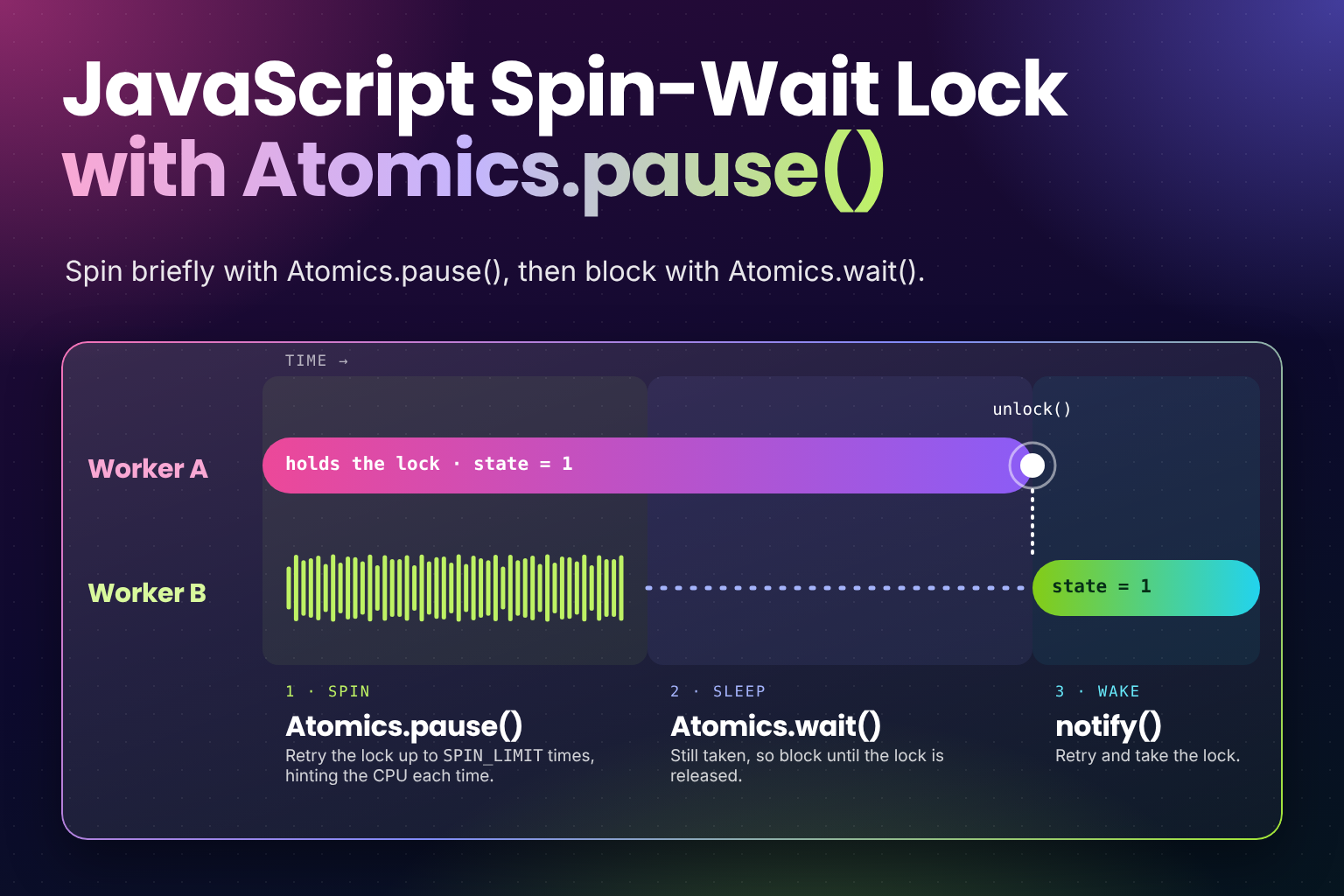
When workers share memory through a SharedArrayBuffer, one of them sometimes has to wait for another: for a lock to
be released, or for a flag to change. A good lock does that in two steps. First it spins for a moment, checking the
value in a tight loop, because the other thread usually finishes within a few hundred nanoseconds. Only if that fails
does it sleep with Atomics.wait() until it's woken up.
The spinning step used to be an empty loop. Atomics.pause(), part of ES2027 (see
What's New in ES2027), makes it a proper spin-wait: it tells
the CPU "I'm waiting on a value", using an instruction such as PAUSE on x86. The CPU can then give shared resources
to the other thread on the same core and save power, and the loop doesn't flood the memory system with reads.
It's only a hint. It doesn't sleep, doesn't yield to the operating system and has no observable effect apart from timing. The specification even suggests engines cap a single pause at tens to hundreds of nanoseconds.
The Code
A small lock over one slot of an Int32Array backed by a SharedArrayBuffer. 0 means unlocked, 1 locked. Save it
as spin-lock.js; the browser example below imports it as an ES module:
const UNLOCKED = 0;
const LOCKED = 1;
const SPIN_LIMIT = 100;

// Falls back to a no-op where Atomics.pause() isn't available, so the loop still works.
const pause = typeof Atomics.pause === "function" ? () => Atomics.pause() : () => {};

export function lock(state, index) {
  // Fast path: the lock is usually free again within a few hundred nanoseconds.
  for (let spins = 0; spins < SPIN_LIMIT; spins++) {
    if (Atomics.compareExchange(state, index, UNLOCKED, LOCKED) === UNLOCKED) return;
    pause();
  }

  // Slow path: still taken, so sleep until unlock() calls notify().
  while (Atomics.compareExchange(state, index, UNLOCKED, LOCKED) !== UNLOCKED) {
    Atomics.wait(state, index, LOCKED);
  }
}

export function unlock(state, index) {
  Atomics.store(state, index, UNLOCKED);
  Atomics.notify(state, index, 1);
}
How It Works
Atomics.compareExchange(state, index, UNLOCKED, LOCKED)sets the slot to1only if it's currently0, as one indivisible step, and returns the value it found. GettingUNLOCKEDback means this thread now holds the lock.- If the lock is taken,
pause()(a thin wrapper aroundAtomics.pause()) hints to the CPU that this is a spin-wait before the next attempt. The loop is bounded: afterSPIN_LIMITtries it stops burning CPU time. - The slow path calls
Atomics.wait(state, index, LOCKED), which puts the thread to sleep, but only if the slot still holdsLOCKED. If the lock was released in between, it returns"not-equal"straight away and the loop tries again, so a wake-up can't be missed. unlock()stores0and wakes one sleeping thread withAtomics.notify(). That thread loops round and competes for the lock like everyone else.
Example Usage
In Node.js
This single file runs four workers that each add 1 to a shared counter 100,000 times, taking the lock around every
increment. Save it as spin-lock-demo.mjs and run node spin-lock-demo.mjs (Node.js 24 or later for the native
Atomics.pause(); earlier versions use the no-op fallback):
import { Worker, isMainThread, workerData } from "node:worker_threads";

const UNLOCKED = 0;
const LOCKED = 1;
const SPIN_LIMIT = 100;
const WORKERS = 4;
const ROUNDS = 100_000;

const pause = typeof Atomics.pause === "function" ? () => Atomics.pause() : () => {};

function lock(state, index) {
  for (let spins = 0; spins < SPIN_LIMIT; spins++) {
    if (Atomics.compareExchange(state, index, UNLOCKED, LOCKED) === UNLOCKED) return;
    pause();
  }

  while (Atomics.compareExchange(state, index, UNLOCKED, LOCKED) !== UNLOCKED) {
    Atomics.wait(state, index, LOCKED);
  }
}

function unlock(state, index) {
  Atomics.store(state, index, UNLOCKED);
  Atomics.notify(state, index, 1);
}

if (isMainThread) {
  // Slot 0 is the lock, slot 1 is a counter the lock protects.
  const shared = new Int32Array(new SharedArrayBuffer(2 * Int32Array.BYTES_PER_ELEMENT));

  const workers = Array.from(
    { length: WORKERS },
    () => new Worker(new URL(import.meta.url), { workerData: shared })
  );
  await Promise.all(workers.map((worker) => new Promise((resolve) => worker.on("exit", resolve))));

  console.log(shared[1]); // 400000
} else {
  const shared = workerData;
  for (let i = 0; i < ROUNDS; i++) {
    lock(shared, 0);
    shared[1] += 1; // a plain read-modify-write, safe only because of the lock
    unlock(shared, 0);
  }
}
It prints 400000 every time. Remove the lock() and unlock() calls and the total can come up short, because two
workers read the same old value and both write back the same new one.
In the Browser
The same lock works inside a Web Worker. The page creates the buffer and sends it to the worker with postMessage(); a
SharedArrayBuffer is shared, not copied. First the page:
// main.js
if (!crossOriginIsolated) {
  throw new Error("SharedArrayBuffer needs a cross-origin isolated page");
}

const shared = new Int32Array(new SharedArrayBuffer(8));
const worker = new Worker("./worker.js", { type: "module" });
worker.postMessage(shared);
Then the worker, which imports the lock from spin-lock.js above:
// worker.js
import { lock, unlock } from "./spin-lock.js";

self.onmessage = ({ data: shared }) => {
  lock(shared, 0);
  shared[1] += 1;
  unlock(shared, 0);
};
SharedArrayBuffer is only available on pages that are cross-origin isolated. The server has to send both of these
headers with the page:
Cross-Origin-Opener-Policy: same-origin
Cross-Origin-Embedder-Policy: require-corp
With them, self.crossOriginIsolated is true. The catch is require-corp: every cross-origin resource the page
loads, such as images, scripts or iframes from a CDN, must opt in with CORS or a Cross-Origin-Resource-Policy header,
or it's blocked.
Use Cases
- Locks and mutexes shared between workers, like the one above.
- Waiting for a flag, such as "the producer has written the next frame", where the wait is usually very short.
- Code compiled to WebAssembly or asm.js-style JavaScript from C, C++ or Rust, whose threading libraries spin before they block.
- Ring buffers and job queues in shared memory, where a consumer briefly spins for the next item.
Notes & Tips
- Never
Atomics.wait()on a browser's main thread. Browsers don't allow the main thread to block, because a blocked main thread freezes the page, so the call throws aTypeError. Workers are the usual way to keep that work off the main thread (see Mastering Asynchronous JavaScript). The main thread can useAtomics.waitAsync(), which returns a promise instead (Chrome and Edge 87, Firefox 145, Safari 16.4). Node.js does allowAtomics.wait()on its main thread. Atomics.pause()is fine on the main thread. It doesn't block, so it can be called anywhere, but spinning on the main thread still delays everything else, so keep any loop short and bounded.- Call it with no arguments. Early drafts had an optional integer argument, where larger numbers meant a longer
pause. It was removed from the specification in 2026 because no engine varied the pause based on it. Engines that
shipped before then, Node.js 26 included, still accept an integer and throw a
TypeErrorfor anything else, such asAtomics.pause(1.5), but the pause is the same length either way. - Keep the spin bounded. A loop of
Atomics.pause()with no limit is still a busy-wait that holds a core at full use. The spin is for waits that are almost over; anything longer belongs inAtomics.wait(). - Tune
SPIN_LIMITby measuring. The right number depends on how long the lock is held and on the hardware. Tens to a few hundred is a common starting point. - Fewer wake-ups:
unlock()above callsnotify()on every release, even when nobody is asleep. Production mutexes use a third state, "locked with waiters", so the uncontended path skipsnotify()entirely. - Browser support: Chrome and Edge 133, Firefox 137, Safari 18.4 and Node.js 24. Where it's missing, the
pause()wrapper above falls back to a no-op, so the spin loop still works, just less efficiently. For the general approach to detecting and filling gaps like this, see Backwards-Compatible JavaScript: Polyfills and Baseline.
Frequently Asked Questions
Key Takeaway
Spin for a bounded number of tries with Atomics.pause() between them, then fall back to Atomics.wait(). The pause is
a CPU hint that makes the short wait cheaper; it never sleeps and takes no arguments in the final specification. Keep
the blocking part in workers, since browsers forbid Atomics.wait() on the main thread, and serve the page with
Cross-Origin-Opener-Policy and Cross-Origin-Embedder-Policy so SharedArrayBuffer exists at all.
Changelog
- — Initial publication.
Share this snippet
Spotted a mistake or something outdated in this snippet? Suggest a correction.